1C
Item master, documents, batches and accounting statuses.

How to work with Chestny Znak in 1C in 2026: marking code export, SBIS/EDI, UTD auto-signing, POS compliance mode, and error control.
Landscape map
Integration works when the physical goods, the 1C document and the code status in Chestny Znak stay in sync.
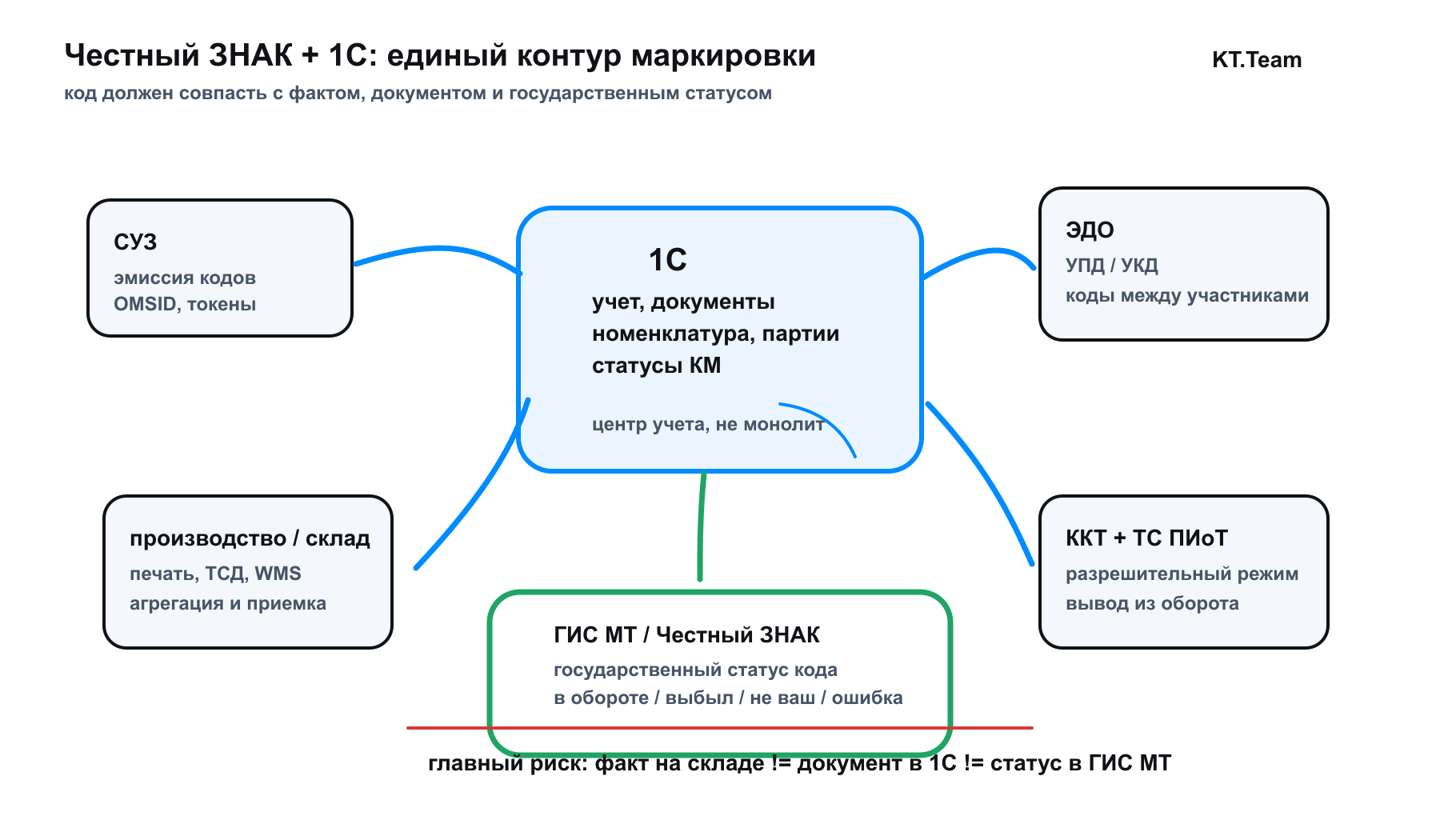
Item master, documents, batches and accounting statuses.
The state status of the code and the right to the operation.
UPD/UKD, permission regime and withdrawal from circulation.
Exchange errors are visible to the responsible staff; retries run without duplicates.
Chestny Znak integration with 1C is needed for daily operations: receive an UPD, match the item master with marking data, sell at checkout, process a return, or record a write-off.
If 1C, EDI, GIS MT, the checkout system, and the warehouse show inconsistent statuses, the goods may be physically present while the operation is blocked or sent for manual review.
As of September 12, 2026, the July EDI and retail withdrawal rules already apply to cosmetics and household chemicals.
The next tasks are MOD registration for manufacturers in this group and preparing canned-goods circulation by October 1.
Below are the participant calendar, the sequence of operations in 1C, and error controls.
Document formats and cash-register checks are selected by product group: requirements are not enabled for the entire product range at once.
Start with the product group, the organization's role, and the operation. The same item may arrive via OSU with a GTIN and quantity, then be sold with mandatory scanning of each package code. Recording individual shipment codes and scanning them at checkout serve different purposes.
| Product group and participant | Date and requirement | What to check in 1C and adjacent systems |
|---|---|---|
| Cosmetics, household chemicals, and personal hygiene products: suppliers and buyers in circulation | EDI for volume-and-assortment accounting is effective from July 1, 2026 | GTIN, quantity and units in the UTD; receipt and shipment without requiring a marking-code list for volume-and-assortment accounting |
| Same group: retailers | From July 1, 2026, sales data for marked goods must be transmitted through cash registers | A 2D scanner, each package code in the receipt, and transmission via the OFD |
| Same group: manufacturers | MOD registration is required from September 1, 2026; for those already registered, the deadline is October 1 | Add sites to the GIS MT profile: FIAS ID and, for a legal entity, its KPP; check that the status is Active and matches the organization's directories |
| Canned goods: manufacturers, importers, wholesalers, and retail buyers | From October 1, 2026, circulation data must be transmitted via EDI under volume-and-assortment accounting | Process a test UTD with the GTIN and quantity; check receipt, discrepancies and the operator's response |
| Canned goods: stores | From October 1, 2026, retail disposal must be processed through cash registers | Scan the Data Matrix on each can; check receipt transmission through the fiscal data operator |
The cosmetics manufacturer's MDM is specified in the GIS MT account profile. As of the review date, including it in the withdrawal document for this group remains optional: do not treat its absence as a general write-off ban. For other goods, check the stage by TN VED/OKPD2 and your group's rules. In the September review, record separately which operations are already mandatory, which start in October, and who will verify the result in GIS MT.
The organization is registered in GIS MT, the QES works, the EDI operator is connected, and GTIN, HS/TN VED/OKPD2, marking flags, warehouses, and user roles are filled in 1C.
Check the group format: for volume-and-assortment accounting, match the GTIN and quantity against the receipt; for item-level accounting, check individual codes. The absence of a marking-code list in a UTD under volume-and-assortment accounting is not, by itself, an error. Document discrepancies before signing.
A handheld terminal or WMS records receiving, aggregation, transfer, and shipment. 1C stores the accounting fact, while GIS MT confirms the official status of the code.
For retail sales, the code is scanned at checkout and sent through the POS terminal and fiscal data operator. For write-offs, defects, internal use, or export, a separate document with the removal reason is required.
The responsible person reviews the exchange log, KM statuses, unsigned UTDs, and checkout refusals. Resubmission must be idempotent to avoid duplicates.
First determine the disposal reason and the product group's accounting format. In retail sales, the cashier scans the Data Matrix, and sales data is sent through the cash register and fiscal data operator. Preliminary validation with sale blocking is used where the authorization mode is already active. For other reasons—write-off, defects, internal use or export—create a document with the reason and data in the required format: GTIN and quantity or individual codes.
| Workflow | What 1C does | What IT/accounting checks |
|---|---|---|
| Retail sale | Sends the item and code to the checkout system and receives the receipt status | POS system, OFD, applicability of permission-based mode, log, and cashier instructions |
| Customer return | Links the return receipt, code, and item status | The possibility of returning goods to circulation under the group rules, with no duplicate marking code |
| Write-off, defects, internal use | Creates a disposal document with the reason and volume-and-assortment data or codes | The validity of the reason, mandatory details, submission to GIS MT, and processing log |
| Shipment to a counterparty | Sends UPD/UKD through EDI with the GTIN, quantity, or codes | Signature, document status, and discrepancies; transmission into circulation is kept separate from retail withdrawal |
From October 1, 2026, for canned goods that are defective, expired, or disposed of, withdrawal data must be submitted within three business days after the write-off report is prepared. OSU applies to most such reasons; retail, online sales, and vending require an item-level format. If the shipment arrived via OSU, individual codes for item-level withdrawal must be counted from the packages.
If there are many scenarios, design it integrating 1C with Chestny Znak as a process with logs, notifications, and an error owner.

In retail, the EDI operator is needed not on its own, but as part of the overall setup:
In practice, the sequence is this: the organization and QES certificate must be ready, the EDI operator must be linked to the legal entity, warehouses and product groups must be set up in accounting, and data exchange with GIS MT must be enabled in the marking service. In Saby/SBIS, they separately check the signature, organization, GLN for transport packages when needed, OMS ID for SUZ, token and retail validation parameters, the code removal method, and user permissions.
First, incoming UPDs must reach 1C with all marking data and not be lost between the EDI operator and the accounting system. Second, outgoing documents must use the correct data format. Third, the checkout system must read the package code and link it to the correct item master; an OSU shipment may not contain individual codes.
If you need the SBIS setup specifically, see the service 1C and SBIS integrations; if the task is broader - 1C EDI and operators are better compared by process, not by name.
EDI transmits marking data within the UTD: GTIN and quantity for volume-and-assortment accounting or individual codes for item-level accounting. In 1C, configure parsing for the required format and monitoring of the GIS MT response. Choose an operator compatible with your existing systems and counterparties: we integrate Diadoc with 1C and SBIS with 1C.
If EDI has not yet been implemented or is used only for accounting, then an analysis of Diadoc and 1C integration The workflows for incoming documents, machine-readable powers of attorney and automated signing are shown. For marking, they also include the product-group format, verification of actual receipt and confirmation that the data has been processed.
Auto-signing is useful only where control is clear: which documents may be signed automatically, who handles exceptions, and where it is visible that the UTD is stuck. The basic setup is this: the qualified electronic signature and permissions are configured for the organization, outbound UTDs are checked for details and codes, then a scheduled job sends the document to the EDI operator, and the log shows the statuses "created", "signed", "sent", "accepted", "rejected".
| Area | What to automate | What must not be handed over without control |
|---|---|---|
| Outgoing UTD | Generation, field validation, signing, and scheduled sending | Documents with discrepancies in codes, price, counterparty, or warehouse |
| Incoming UTD | Import, code matching, notify the responsible person | Auto-signing without matching actual receipt |
| UTD corrections and amendments | Approval workflow and resubmission | Corrections without justification or linkage to the source document |
| SLA for documents | Alert for unsigned and rejected documents | Stuck UTDs that employees bypass with manual actions |
For the business process, the important thing is not the "sign automatically" button, but the procedure: who is allowed to auto-sign, which checks are mandatory before sending, and who resolves the error before shipment is blocked.
The authorization mode checks the code before the receipt is issued and blocks the sale when a prohibition ground is established. It applies according to the product-group calendar. For cosmetics and household chemicals, retail disposal becomes mandatory in July 2026, while the authorization mode starts on April 1, 2027. Including the code in the receipt does not, by itself, mean that all cash-register blocks are already mandatory. The PiOT technical solution is required for participants who sell through cash registers and must perform authorization checks under Resolution No. 1944.
Chestny Znak's September 10, 2026 clarification states that X-APIKEY continues to work technically after July 1, but the absence of a PIoT technical solution is recorded as a deviation. A working token does not remove the obligation to install an available compatible solution. Check the POS model, checkout software, and module version in the official calculator; if no solution is available, monitor the registry with the checkout software provider.
| Checkout situation | What the cashier does | What IT/the responsible person does |
|---|---|---|
| Code approved | Sells the item in the usual way | Monitors receipt transmission and withdrawal processing |
| A prohibition was received in the authorization mode | Sets the goods aside according to instructions and does not bypass the block | Checks the specific reason, marking-code status and supply documents |
| No response from GIS MT/module | Operates according to the offline-mode and timeout instructions | Checks service availability, the driver, module and log |
| Common refusals for the group | Escalates the issue to the responsible person | Matches GTINs and releases and checks whether validations apply; under volume-and-assortment accounting, it does not require confirmation of the owner of an individual marking code, unlike item-level accounting |
Check the checkout system's current POS driver, fiscal data format, product group settings, OFD connection, and response log. Analyze rejections by cause: connection errors, incorrect settings, and sales restrictions require different actions.
In the working loop 1C holds the item master, batches, movement documents, code statuses and the link to source operations. The other systems cover their own areas: EDI transmits the UPD document, GIS MT stores the code state, SUZ issues codes, the cash register retires goods from circulation, scanners and WMS record actual movement.
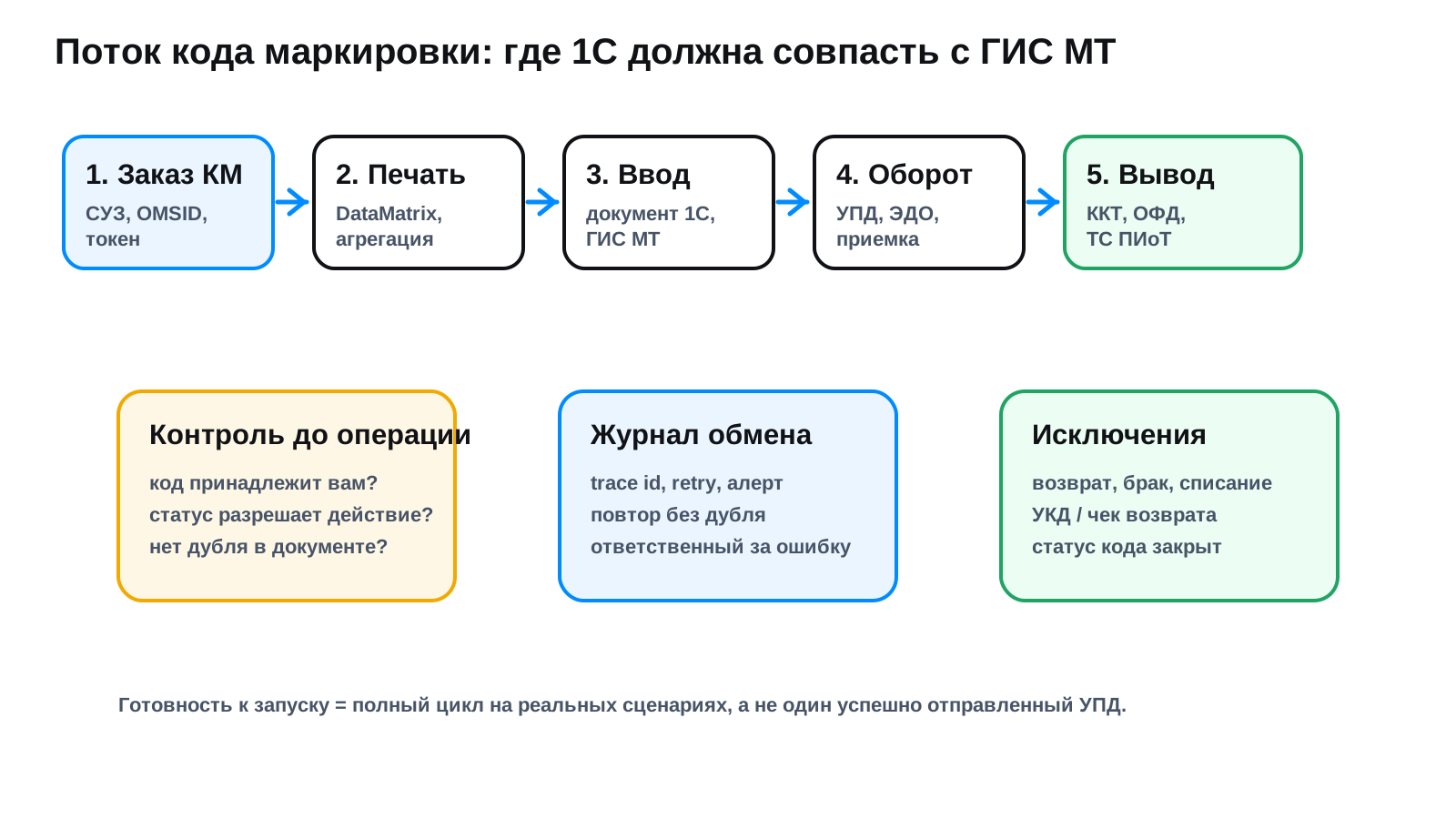

| System or layer | What it is responsible for | What to monitor |
|---|---|---|
| 1C ERP / Trade Management / Retail / Accounting | Item master, documents, batches, code statuses, accounting and warehouse records | Exchange errors, duplicate documents, mismatch between marking code and item master |
| EDI | UTDs, UADs, discrepancy reports, and transmission of volume-and-assortment data or codes | Incomplete marking data, unsigned incoming documents, and overdue responses |
| GIS MT / Chestny Znak | State status of the code: emission, entry into circulation, circulation, retirement, return | Codes are not yours, not found, already retired or awaiting confirmation |
| SUZ | Ordering and receiving marking codes | Tokens, OMSID, code balance, emission errors |
| POS / OFD / TS PIoT | Verification and retirement from circulation at retail sale | Verification failures, service downtime, offline mode |
| TSD / WMS / printers | Actual scanning, aggregation, label printing | DataMatrix print quality, duplicate scans, lost cases and pallets |
| Integration layer | API, queues, redelivery, logs, idempotency | Accumulating errors, uncontrolled resending, no trace id |
Prepare the legal and accounting setup: registration in Chestny Znak, qualified electronic signature, EDI operator, user roles, and managers responsible for product groups.
Clean up master data: item master, GTIN, HS code/OKPD2, marking attributes, units of measure, packaging, and aggregation rules.
Set up integrations: 1C - EDI, 1C - Chestny Znak/SUZ, 1C - cash registers, 1C - handheld terminals/WMS, exchange logs, and error notifications.
Run a test cycle: code order, printing, commissioning, receiving, shipment, retail sale, return, and write-off.
Lock in operations: an update policy, error owners, an SLA for clearing stuck documents and release control for 1C/POS/data terminals.
| Business role | Main scenario | What to automate in 1C | Where it breaks most often |
|---|---|---|---|
| Manufacturer | Ordering marking codes, printing, applying, aggregation, entry into circulation | Emission order, label printing, marking goods in the IS MP system, writing off defects | GTIN, print quality, defective or unused codes |
| Importer | Obtaining codes before import and putting them into circulation after customs procedures | Linking item master, codes and receiving documents | Codes not matching the goods and document delays |
| Wholesale and warehouse | Receiving UTDs by volume-and-assortment data or codes, preparing shipments and EDI | Match the GTIN and quantity; upload marking codes where item-level accounting is required | Incorrect UPD format; discrepancies in quantities or codes |
| Retail | Checkout withdrawal; permission-based mode according to the group calendar | Marking code verification, exchange with cash registers/OFD, returns and correction receipts | POS software is not ready, no TS PIoT, the code fails validation |
| Accounting and IT | Control of documents, discrepancies and exchange errors | Logs, reports, notifications, resending without duplicates | No incident owner, errors pile up for weeks |
| Error | Operational symptom | Reason | What to do |
|---|---|---|---|
| UPD arrived without codes | Receiving stalls, the goods cannot be sold correctly | The supplier did not send the marking code, or the document is not matched | Do not sign until fixed, file a discrepancy report, set up inbound control |
| Code not found or not yours | 1C sees the goods, GIS MT does not confirm the right to the operation | The code belongs to another owner, has already been retired or was never put into circulation | Check the status before shipment, require a valid document from the supplier |
| Duplicate marking codes | The document is not sent or gets rejected | Rescanning, manual entry, resending the UPD | Block manual entry without a role, enable duplicate checks and idempotent exchange |
| Poor DataMatrix print quality | Scanner cannot read the label | Printer, consumables, size, damage during application | Test printing, log defects, write off unused codes |
| The return was not posted in the system | The goods came back physically, but the code did not return to the right status | The return was processed only at the warehouse or the cash register | Process the return with a valid document, correction document (UKD) or return receipt |
| Exchange errors are not investigated | Documents get stuck, staff resort to workaround operations | No monitoring and no incident owner | Set up a log, alerts, a resolution SLA, trace id and resending |

| Verification | What must be ready |
|---|---|
| Calendar | Dates, accounting format, and responsible owner are recorded for each group; manufacturer MDM and October operations have been checked |
| Master Data | GTIN, HS code/OKPD2, marking attributes, packaging, units of measure |
| EDI | The operator is connected, UPD/UKD go through, inbound documents are tracked against deadlines |
| SUZ and GIS MT | OMSID, tokens, organizations and warehouses linked; exchange verified on test operations |
| POS and TS PIoT | The POS system and OFD transmit receipts; permission checks and the PIoT technical solution are configured for groups where they are mandatory |
| Scanning | TSD, WMS, printers and Data Matrix quality verified on real packaging |
| Monitoring | Exchange errors, duplicates, stuck documents and marking code statuses are visible to the responsible staff |
| Operations | There is an update procedure, an incident owner and a process for manually handling exceptions |
If gaps remain after the checklist - assess your 1C readiness for product marking: we will review your setup and show what to resolve before going live.
The operator sees an error in a specific document. The manager sees something else and makes decisions based on different signals.
A marking failure does not stop accounting, it stops the sale. Authorization mode triggers at the checkout, on the sales floor, at the moment when the customer is already standing there with the item. The product is physically available, but the transaction is blocked, and this happens not at a convenient time, but at peak hours, when status mismatches between 1C, EDI, Chestny Znak, and the cash register have built up over the shift.
Manual discrepancy handling keeps people busy with work they were not hired to do. While volumes are small, one employee who "knows the workaround" can cover it. That is the main risk: the process depends on a person, not on procedure, and goes on vacation with them.
Scale breaks a manual process in predictable ways. Several legal entities, warehouses, and cash registers, and the order of operations described above as a sequence of steps no longer works the same way. From there, the question is no longer who made the mistake, but that the system chain does not check itself.
So you should not ask the team whether there were any errors. Ask three things: how many shipments a month ended up in manual review, how many people know how to resolve it, and what will happen to sales if auto-signing fails tomorrow. If the answers are unknown, the process is not observable, and therefore not manageable. What a complete setup looks like is shown above in the sections on the integration architecture and system roles.
Not customization for its own sake, but a clearly bounded setup: exchanges run through a bus, not point to point, so the next marking rule change will not stop the entire accounting system.
We configure the receipt and exchange of code data: issuance, commissioning, aggregation, status, and operation confirmations without discrepancies between 1C and the state registry.
We map DataMatrix to the item master, batches, and movement documents - from UTD receiving to shipping, box aggregation, and pallet aggregation.
We build withdrawal scenarios: retail sale through the cash register/OFD, write-off, defects, internal use, and export - each with its own document and data submission to GIS MT.
We connect 1C with Sbis/Saby, Diadoc, or another EDI operator: signing, checking details and codes before sending, and a status log for each document.
We work with the current release of any configuration - retail checkout, small business on SMB, accounting, or a full ERP setup with multiple legal entities and warehouses.
We move exchanges into an integration layer with event logging, retry delivery, and idempotency - 1C remains a strong accounting system, not a single point of failure.
Case
1C + Chestny Znak
We will assemble and verify the full marking lifecycle: code issuance, UPDs with codes, receiving, sales, returns, write-offs, POS approval mode, and an error log. The result is a clear setup with no duplicates, no manual workarounds, and no dependence on a single developer.
A bad option is to hard-code all marking logic into 1C customizations without boundaries.
Then any change to a rule, cash register, WMS, EDI or product group becomes a risk for the whole system.
A more resilient approach is to keep 1C as the accounting hub and move data exchanges into a loosely coupled loop: API, a queue or ESB, explicit contracts, an event log, redelivery, idempotency and monitoring.
This makes it easier to update separate parts, hand support to another team, and avoid keeping the business dependent on a single developer.
For KT.Team this is a matter of principle: 1C must be a strong accounting system within a heterogeneous landscape, not the single platform through which every business change has to pass.
FAQ
Identify the withdrawal reason and product group format. Retail sales are transmitted through the POS system/OFD after scanning the code; permission checks apply according to the group calendar. For other reasons, prepare a document with the reason, GTIN and quantity, or individual codes, and monitor processing in GIS MT.
Check the organization, qualified e-signature, EDI operator, user permissions, warehouses, product groups, and integration with GIS MT. In Saby, configure the certificate, organization, GIS MT settings, token/retail verification settings, OMS ID when working with SUZ, and the code write-off method. In 1C, it is important that UTDs with codes, document statuses, and cash register operations stay aligned across systems.
Yes, but only after checking the details, marking codes, and signing rights. Without a policy, auto-signing speeds up errors, not the process: the UTD is sent with incorrect codes, gets stuck with the EDI operator, or comes back rejected. You need rules for which documents are signed automatically, which go for manual review, and who handles exceptions.
Check your group's document format against the calendar above. The next tasks are MOD registration for cosmetics and household-chemical manufacturers by October 1, and preparing EDI and cash registers for canned goods from October 1. Also check whether the authorization mode applies and whether the PiOT technical solution is compatible with your cash register.
For standard scenarios a current 1C release, configured EDI and enabled marking functionality are often enough. Custom development appears when there is a WMS, non-standard aggregation, complex packaging, several legal entities, special warehouse rules or monitoring requirements.
The accounting record in 1C and the operation status in GIS MT may differ: the code may not have been introduced into circulation, may already have been disposed of, or the document may not yet be processed. Under volume-and-assortment accounting, do not check the owner of an individual code using item-level accounting rules; first match the product-group format and refusal reason.
You need to run the full cycle on real scenarios: issuance, printing, introduction, receipt, shipment, sale, return, write-off, exchange error, and resubmission without duplicates. One successfully sent document does not prove the environment is ready.
Verification date: 12 September 2026