SSO and service catalog in 2 months
- SSO and a contractor service portal launched in 2 months
- Support workload decreased
- Contractor onboarding sped up

How real estate CRM unites leads, bookings and deals, reduces lost inquiries, accelerates sales and provides accurate analytics by property and channel.
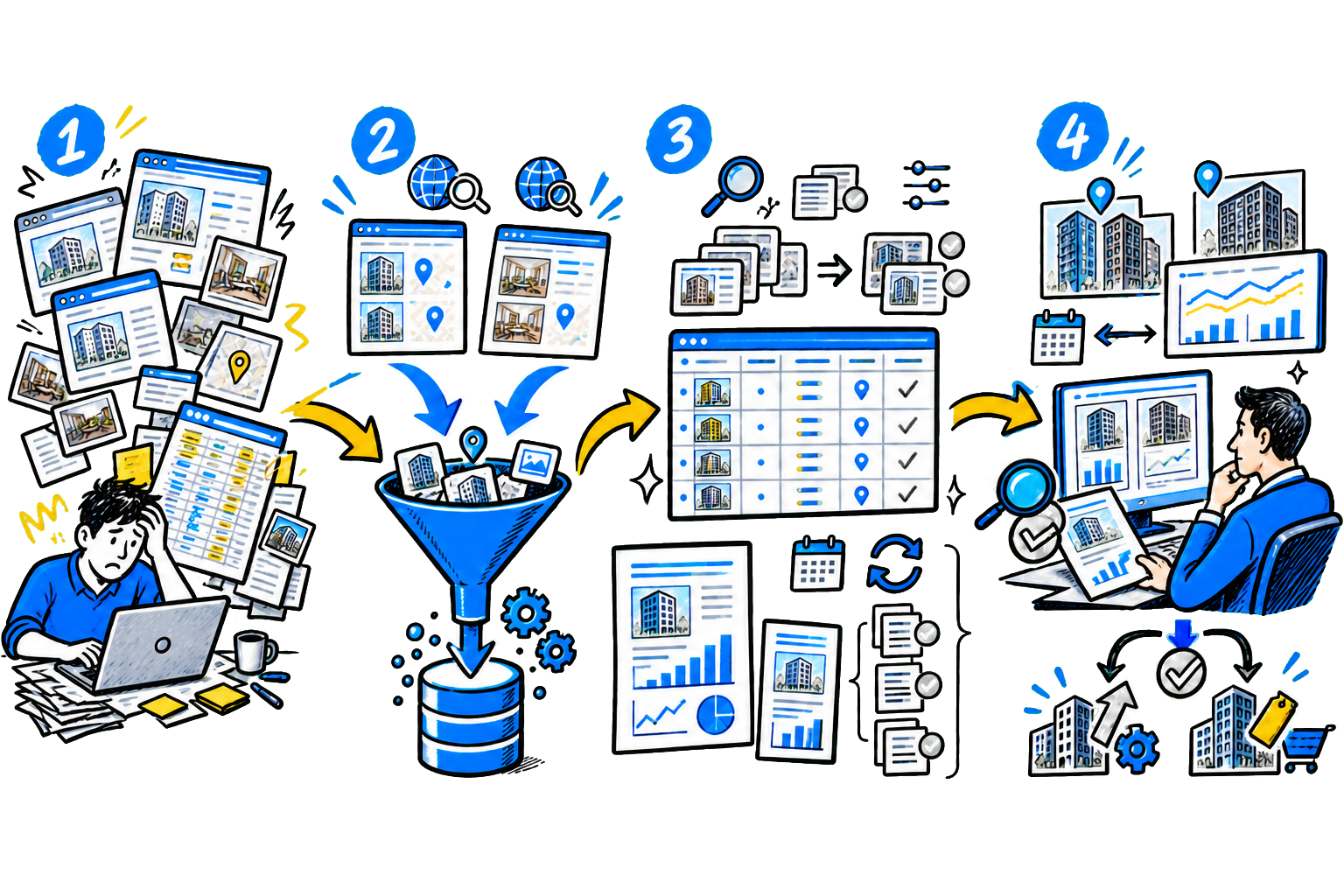
Sales in property development quickly get out of control if inquiries, reservations, and deals are tracked in different systems or spreadsheets. Let's look at how CRM for a property developer helps bring order to processes, what tasks it solves, what functionality is really needed, and how to choose a system without unnecessary costs.
Sales of apartments and commercial spaces in new developments require precise control at every stage:
A developer works with large volumes of data and parallel processes, where an accounting error under Federal Law 214 directly leads to financial losses. CRM for developershelps guide the client from the first inquiry to signing the DDU and then to apartment handover.
The system brings sales, marketing, legal, and management together in one place: everyone sees up-to-date data and works without gaps between departments. Important: general-purpose CRM They do not account for developer-specific needs: they lack apartment availability grids, flexible price management, and integration with property marketplaces. That is why a developer needs a system that already includes industry-specific features and supports key sales processes.
What tasks does a CRM solve? A real estate deal lasts 6-12 months. During this time, the client compares options, arranges a mortgage, and prepares documents.
A manager handles dozens of such clients at the same time; without a system, part of the inquiries is lost and statuses get mixed up. A CRM for developers covers the core processes: - Manages all properties in one system: residential complexes, buildings, and phases. - Displays apartments in a visual availability grid so you can instantly see what is free, reserved, or sold. - Automatically collects inquiries from Cian, Avito, Domclick, and Yandex Real Estate. - Records reservations and prevents the same apartment from being sold twice. - Generates the DDU and sends documents for electronic registration.
Money and escrow control The system records when the buyer opens an escrow account and transfers funds. If a payment is delayed, the manager receives an immediate alert. The finance team can see how much money has already arrived and when the accounts will be released. This helps plan cash flow without manual spreadsheets.
Working with agencies CRM clearly records who brought the client in: it logs the lead source, the date of first contact, and calculates the agency commission.
Disputes disappear, the manager sees which partners actually bring in deals, and reallocates the budget. According to studies for 2025: - 81% developers are developing BI reporting; - about 50% lose customers at the initial request handling stage; - 94% companies are working on conversion growth. The numbers prove it: without a transparent accounting system, the business loses money right at the start of the funnel.
According to a survey of executives%5Breference:1%5D) of the largest developers 81% companies rely on analytics. However, reports do not work on their own - first, the system must collect accurate data on calls, reservations, contracts, and payments. If the CRM lacks basic modules, reports show a distorted picture and do not help manage sales. Let's look at the core CRM functions without which reliable analytics is impossible.
Visual property management - availability grid The software shows apartments in an availability grid: the specialist can see what is free, reserved, and already sold. They can match a buyer with an option in minutes and immediately record the reservation. Without this visualization, managers track everything in spreadsheets and often mix up statuses. As a result, the same apartment can be promised to different clients - the CRM removes this risk and records all changes in real time.
Deal registration The system automatically inserts the client and apartment data into the DDU template. The employee does not spend hours preparing it, and the document is ready in 10 to 15 minutes. CRM checks the data, reducing the number of contract errors. All approval stages happen inside the system, from the manager to the executive. After signing, CRM sends the documents for electronic registration and stores the full client history in one place. Sales funnel by property The system shows the funnel separately for each residential complex or building.
The manager can see how many inquiries came in, how many units were reserved, and how many deals were closed. The system assigns tasks to the manager, reminds them of deadlines, and records every step. This reduces losses in a long sales cycle that can last up to a year. Analytics and reports CRM collects information from all channels and displays it in reports. The developer can see conversion by stage, ad performance, and sales plan fulfillment. Management understands which sources deliver real deals and which bring only inquiries.
Such analytics help reallocate the budget and forecast cash inflows without manual spreadsheets. With integrations to external services, the developer CRM automatically collects inquiries from the website and real estate portals: every request goes straight into the system and is not lost. Calls are recorded and saved in the client profile, and messenger conversations also stay inside the CRM. The system exchanges data with banks, accounting systems, and ERP.
The manager does not need to duplicate information and works in one window. Online booking and price management The system lets the user choose an apartment on the website and reserve it. It checks the status in real time, so two reservations for the same unit cannot happen. The client receives confirmation immediately, and the developer gets a new deal. CRM recalculates apartment prices automatically according to predefined rules.
The system takes demand, construction stage, and other factors into account, saving employee time and helping increase revenue without manual calculations. Buyer portal CRM gives the buyer access to a portal where the deal status, payment schedule, documents, and construction progress are visible. The client resolves most issues independently, reducing the workload on managers and increasing deal processing speed. Partners and agencies also work through a separate portal.
They submit requests, track deals, and exchange documents without calls or email threads. This reduces processing time and removes errors caused by manual entry. Mortgage and installment plans The system helps select a mortgage for a specific client and apartment. The employee can see terms from different banks, compare payments, and send applications right away, with responses arriving directly in the system. All loan information is stored in one card, without extra spreadsheets or files.
Construction quality control and apartment handover In CRM, issues can be logged directly on site: the specialist takes a photo, describes the problem, and marks it on the plan. The contractor receives the task immediately and fixes the defect. During apartment handover, the system speeds up inspection: the employee completes a checklist and records issues in seconds, which reduces defects and speeds up move-in.
There are many CRMs on the market, but far from every one is suitable for a developer. A mistake at the selection stage leads to custom work, wasted time, and lost money, so it is important to choose a solution that covers the key tasks from the start. What to look for when choosing a system: 1. Industry-specific functionality- The CRM should support an apartment availability grid, reservations, and property management. A manager should see the entire deal: from lead to contract and payment. If it does not, the system will need customization.
2. Scalability- the software should handle growth in the number of properties and employees without issues. Check how new projects and users are added. It is important not to have to switch CRM systems as the business expands. 3. Integrations- The CRM should automatically receive inquiries from listing platforms and exchange data with banks, Rosreestr, and 1C. This reduces manual work and errors. The more ready-made integrations there are, the faster the launch.
4. API and custom development- if you plan to build your own services or custom processes, check whether an open API is available. Without it, any changes will be expensive and slow. System flexibility matters during growth. 5. Ease of use- the team uses the CRM every day, so the interface should be simple. Check speed, screen logic, and mobile usability. If the system is inconvenient, employees will ignore it.
6. Vendor experience - choose integrator, which has already worked with developers. Review real case studies and ask how the implementation went. The vendor should understand sales processes in construction. 7. Support- find out how quickly support responds and whether it helps solve real issues. It is important to be able to fix errors quickly. Without proper support, the system will quickly grind to a halt.
8. Cost- factor in not only the license, but also implementation, training, and support. Cheap solutions often require customization and end up costing more. Estimate costs over 1-2 years. 9. Data security- The CRM stores personal data customer and financial information. Check where the servers are located and how backups are made. The system must comply with legal requirements.
10. Testing before purchase- request demo access and give it to key employees. Let managers try to run real deals: this way you will see weak points before signing the contract. Let's compare 6 CRM systems most in demand among developers:
| System | What the developer gets | What functions are included out of the box |
|---|---|---|
| MacroCRM | A solution with ready-made tools for real estate sales. Suitable if you need to launch quickly without custom work. | Unit availability grid, reservations, equity agreement templates, integrations with real estate portals, customer portal. |
| Profitbase | A set of modules for developers that expands the capabilities of other CRMs. Convenient if you already have a basic system and need to add industry-specific features. | Unit availability grid, reservations, mortgages, customer portal, integrations with banks. |
| SberCRM | A CRM with basic sales and document management features. Suitable for getting started, but requires customization for development sales. | Document handling, reports, integrations with banking services; industry-specific features must be added. |
| amoCRM | A simple system for working with leads. Suitable for a developer with additional modules. | In the basic version, only the sales funnel; the unit availability grid and reservations are added through external solutions. |
| BPMSoft | A flexible tool for large companies. Allows you to configure complex processes to fit your needs. | Reports, process setup, integration with 1C; industry-specific features are configured separately. |
| Bitrix24 | A general-purpose platform with CRM and task management. Requires customization to work with real estate. | Basic CRM, tasks, telephony; industry modules are connected through apps. |
If you run a large development business, the system should cover the entire sales cycle - from the first inquiry to handover of the apartment, without gaps between departments. It is important that the CRM already supports properties, documents, and finance, or allows you to configure processes flexibly to match your rules. Pay attention to integrations with banks and Rosreestr, detailed reports, and access rights management - otherwise it is hard to manage a large volume of deals.
The CRM must remain stable under load and support hundreds of employees working at the same time, so the team does not lose data or time. If you are just launching a project, the developer CRM should help you start sales quickly without a long implementation or complex setup. Choose a cloud solution that already includes the basic functions: request tracking, apartment availability grid, and document handling - this is enough to avoid losing customers and keep deals under control.
It is important that the system can be expanded gradually: new modules and users can be added without moving to another platform. This approach avoids overpaying at the start and lets you scale the business smoothly as it grows. We explained in detail how to implement a CRM for developers correctly here.
Situation:A large developer sold apartments in six residential complexes and received inquiries from different sources: Cian, Avito, Domclick, ads, and social media.
All inquiries came in via email and messengers, and the manager manually distributed them among sales reps.
As a result, specialists replied after an average of 2.5 hours, losing some clients, who went to other developers.
Booking conversion stayed at 1.9%, while the company did not understand which channels were actually generating deals. Solution:partner team automated the sales funnel for each property and found the stages where inquiries were being lost.
Experts implemented a developer CRM based on Bitrix24: they connected the system to the websites so inquiries would go straight into the workflow, and configured analytics with UTM tag transfer.
After that, property aggregators were connected through API - leads started flowing directly into the CRM without email or manual processing.
Next, the experts set up automatic request routing: the system considers rep workload, the property, and the client's parameters, then assigns the responsible person immediately.
The manager no longer spends time on manual assignment.
At the same time, funnel reports were added: now it is visible how many inquiries pass each stage and which channels bring deals, not just traffic. Result: -
Inquiry response time dropped from 2.5 hours to 30 seconds. -
Booking conversion increased from 1.9% to 2.4% in two months.
Lead loss during processing decreased by 35%.
The company shut down two ineffective advertising channels and reallocated budget toward sources with ROMI above 300%. -
The number of employees was reduced from 45 to 38 without any drop in sales volume. -
The manager started seeing bottlenecks in the funnel in real time and could adjust the team’s work faster.
FAQ
A CRM for developers accounts for real estate specifics: it shows apartments in a unit availability grid, records reservations, works with equity agreements, and integrates with portals and banks. A standard CRM does not include this functionality; it is added through customization or integration with industry solutions.
It is best to implement the tool at the start of sales or when the number of inquiries is growing. If specialists can no longer process leads in time and are getting confused about statuses, you are losing money, and the software is needed immediately.
Basic setup can be done in 2-4 weeks if you use a ready-made solution. Full implementation with integrations and process setup takes 2-3 months.
Yes, integration with 1C at the start eliminates double entry for payments, invoices, and acts. Managers do not waste time manually transferring numbers, and finance sees up-to-date receipts without delay.
The solution speeds up inquiry processing, prevents lead loss, and shows where clients get stuck in the funnel. As a result, conversion grows and losses decrease at every stage of the deal.
Yes, even with a small number of properties, the system helps keep deals under control. This is especially important at the start of a project, when every client affects revenue. In addition, the CRM immediately brings order to processes, so you will not need to reorganize operations as the company grows.
The system records the inquiry source and automatically calculates the commission, which removes disputes, speeds up settlements, and shows which partners are bringing deals. The developer can see conversion by each agency and work only with those that deliver results.
The cost depends on the chosen system, the number of users, and the feature set. Expenses usually include the license, implementation, and team training. It is important to plan the budget 1-2 years ahead to avoid unexpected costs after launch.
Quite often, companies choose a system without considering industry specifics, do not check integrations, and do not test it before buying. As a result, the CRM has to be customized or replaced within a year. Team training is also often underestimated, which means employees do not use the solution to its full potential.
{{cta}}