Conversation
The agent replies in the connected channel and clarifies missing information.

Learn how to configure an AI agent in amoCRM for lead qualification, knowledge-base use, manager handoff, and safe pilot testing.
Process map
An incoming inquiry passes through the knowledge base and qualification rules. The agent gathers context, records the result in amoCRM, and hands the conversation to a person at the right time.
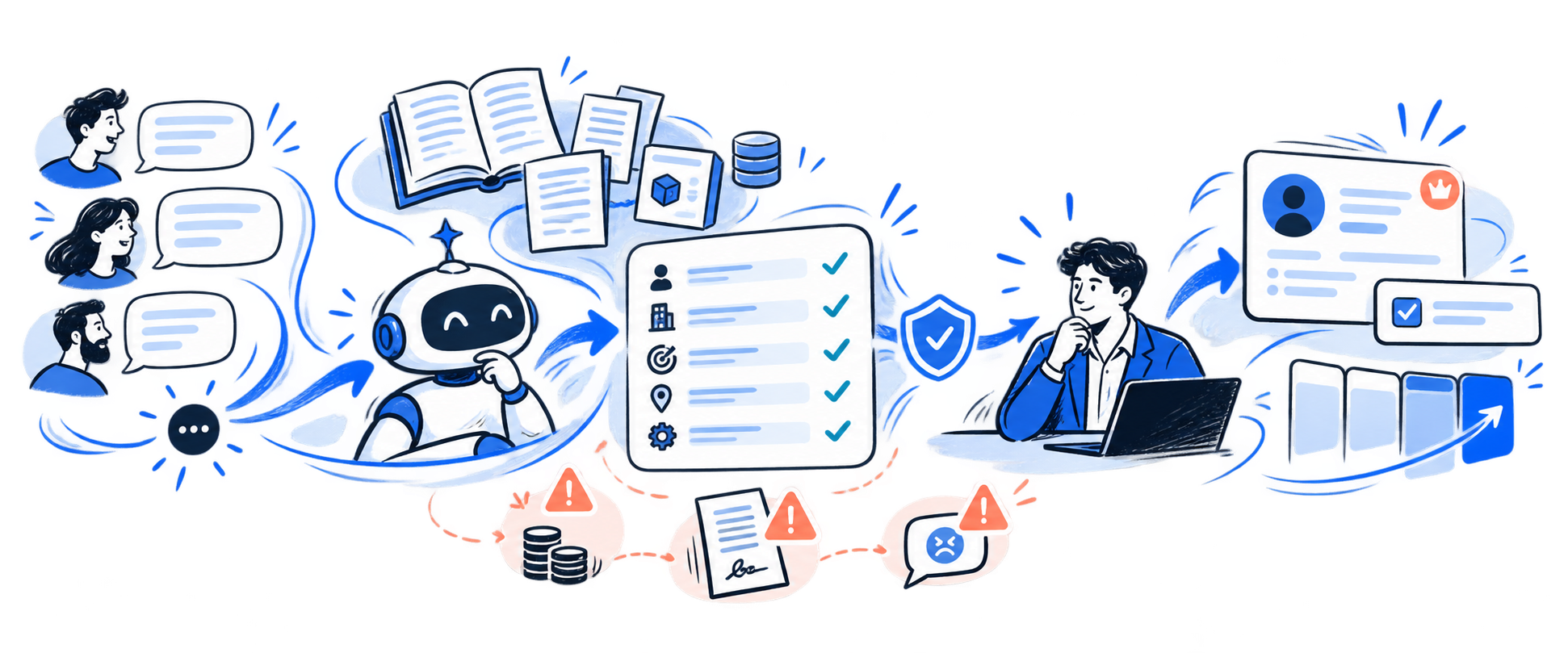
The agent replies in the connected channel and clarifies missing information.
The answer is based on an approved knowledge base, catalog, and rules.
The need, timeline, role, and next step are recorded in the record.
Price, agreements, conflicts, and unusual requests are handed over to a manager.
A regular chatbot follows a predefined script. An AI agent in amoCRM can answer questions, recommend products, qualify inquiries, fill in fields, create tasks, change the assignee or deal stage, and launch Salesbot. But a list of capabilities alone does not make a conversation useful for sales.
The unit of work here is not a reply but a controlled transition: understand the request, gather missing information, record the result in the record, and give the manager a clear next step. If the agent merely keeps the conversation going while the manager rereads the entire exchange and repeats the questions, automation shifts the work instead of reducing it.
That is why configuration does not start with a prompt. First, define the funnel stage, required fields, available sources, the agent’s permissions, and the point of handoff to a person. Native amoCRM features provide basic actions within the CRM; a separate integration layer is needed when qualification depends on external systems or complex business logic. The broader context of working with the funnel is covered in the article “How to set up a sales pipeline in amoCRM”.
Formal scenario
Controlled dialogue
Agent checked
The inquiry matches the target profile. The basic context has been collected, but before making an offer, clarify the contact’s role, current system, and decision criteria.
Suggested action
Hand off to the manager with a summary and suggest a brief meeting to clarify the process
After confirmation: amoCRM: deal fields + task + owner · awaiting manager acceptance
Trace: dialogue + knowledge base + qualification rules + activity log
| Situation | What the agent does | What remains for people |
|---|---|---|
| Typical product question | Finds an answer in an approved source and continues qualification | Updates the source when the product changes |
| Timeline, budget, role, objective | Clarifies and records confirmed data in the record | Checks disputed or contradictory answers |
| Price, discount, contractual terms | Records the request and hands over the dialogue | Confirms a commercial commitment |
| Complaint, conflict, or request for a manager | Stops the autonomous flow and creates a task | Continues the conversation |
| Unknown or ambiguous question | Says it will clarify the answer and passes on the context | Makes the decision and expands the knowledge base |
The most noticeable error occurs when a manager has already joined the conversation but the agent continues replying in parallel. To the customer, this looks inconsistent: two contacts ask similar questions, use different wording, or interrupt each other.
In amoCRM, a manager’s reply does not necessarily stop the AI agent. The workflow must explicitly define when to stop it: by assigning an owner, setting a system field, using a command, changing a stage, or triggering another unambiguous event. Re-enabling it must also be controllable.
A useful rule: at any moment, a dialogue should have only one active owner. Handoff is complete when the agent stops sending messages, the manager receives a summary, and a task appears in the CRM.
The agent responds only within the permitted scope and returns the result to amoCRM
Input
Context
AI agent
Control
Result
The amoCRM AI agent can use text, files, website pages, and a product catalog. But the volume of sources does not guarantee answer quality. If prices, terms, or terminology differ across documents, the agent cannot determine which version is authoritative.
Each source needs an owner, review date, and clearly defined scope. It is useful to separate stable product information from changing commercial terms. Prices, discounts, individual timelines, and legal commitments should not become free-form agent responses.
When loading a website, consider technical limitations: pages requiring authentication, CAPTCHA, or content that appears only after JavaScript execution may not be added to the knowledge base. Images within documents and pages should not be the sole carrier of an important condition either. After updating a source, rerun the full set of control questions.
Limit the pilot to one channel, one pipeline stage, and one type of inquiry with recurring questions and a clear next step.
Separate autonomous replies, actions requiring manager confirmation, and unconditional stop signals.
Assign owners, remove contradictions, and create a test set of typical, rare, and provocative questions.
First compare the agent’s replies with managers’ decisions without automatic sending, then open a limited live flow.
amoCRM pilot
1 flow
We will start with a specific type of inquiry: define qualification and boundaries, prepare sources, create a manager handoff flow, and test it on a control sample.
FAQ
Yes, if the volume is limited, answers rely on verified sources, and the cost of an error is low. Initially, the manager should confirm pricing, contractual terms, and unusual commitments.
Not necessarily. The flow must explicitly define a stop event and be tested on the actual channel. Otherwise, the client may receive parallel responses.
Only those that change the deal path or next step: objective, usage context, timeline, role, constraints, and the agreed way to continue. Fields added “just in case” make the dialogue longer.
Compare the pilot flow with the baseline by the speed of a substantive response, the accuracy of completed fields, handoff quality, errors, and the share of inquiries reaching the required next step.
Review date: 21.10.2026