Developer automation: how to cut errors, shorten timelines and optimize costs

How automation helps developers cut errors, speed up processes and better control costs.

  • What automation delivers in construction: numbers and real results
  • Digitalization is working with data:
  • Automation is when the system does the work instead of a person, and it:
  • What changes after developer automation is implemented

Automation in construction is already delivering measurable results: it shortens timelines, reduces errors, and helps control costs. But not everyone gets the same benefit - much depends on the implementation approach. Here is how developer automation helps you see the situation in real time, which processes to automate first, and how to implement the system without mistakes.

What automation delivers in construction: numbers and real results

Automation in construction has been developing for many years. Even in the USSR, people tried to build construction management systems at the industry level. But at the time, technology was not sufficient to make it work in practice. The situation changed in the 2010s: developers began implementing _BIM_ the digital twin of the asset with all project data, and gradually move away from paper document flow.

First in design, then in construction management and procurement. A move to digital alone is no longer enough. If the system only displays data, it does not solve the problem of speed and errors. The effect appears when the software does more than record information and actually triggers actions according to defined rules.

How automation differs from digitalization Digitalization is working with data: - you record processes in the system; - you see work status, deadlines, and deviations; - you analyze the situation and make decisions. Automation is the system working instead of a person, which: - responds to changes on its own; - recalculates the schedule; - assigns tasks; - starts the required processes without manual input.

The difference is easiest to see in an example: with digitalization, the business records a schedule delay and manually decides what to do, while with automation the system recalculates the plan, reallocates resources, and notifies the team. As a result, manual work is reduced and the response to changes is faster. This usually happens in stages: first the data is cleaned up, then automated scenarios are added, and only then do they start affecting deadlines, costs, and project controllability.

Discuss your challenge with an architect

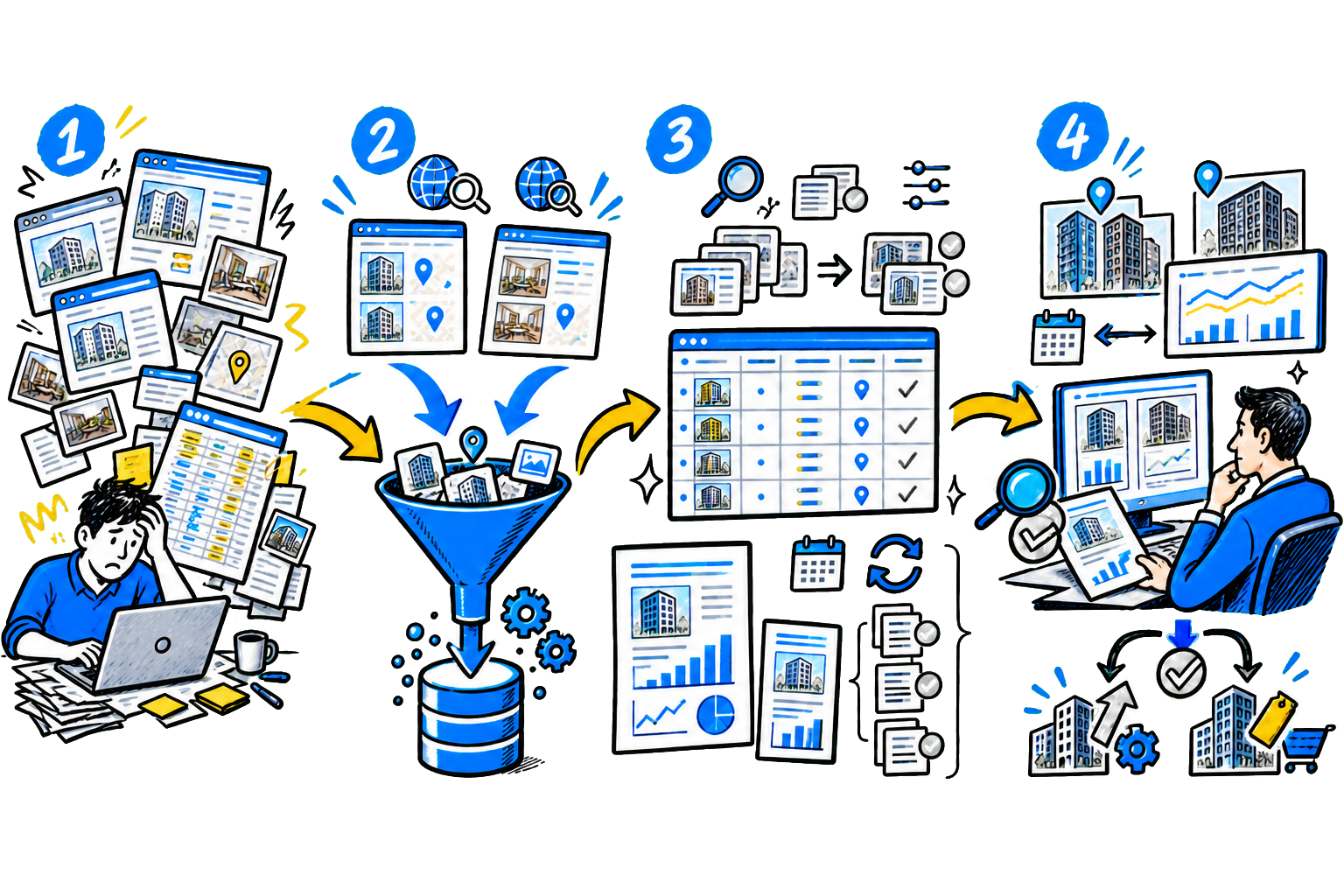
What changes after implementing developer automation After implementing automation, the developer stops managing construction based on reports and starts seeing the situation in real time. Decisions are made immediately, without delays or unnecessary approvals.

Company: - Cuts construction timelines by up to 25% - the system shows actual progress every day, the business reacts quickly to deviations and does not lose time. - Reduces errors and rework by 35-60% - all issues are logged in the system, contractors do not lose information and do not repeat mistakes. - Reduces material overruns by 4-5% and more - tracks stock in real time, the system generates requests automatically and prevents unnecessary purchases. - Speeds up document work several times over - requests take 15-30 minutes instead of days, and the system routes them for approval automatically. - Improves team productivity - the solution automatically assigns tasks, shows equipment utilization, and helps redistribute resources. - Wins more tenders - meets BIM and transparent reporting requirements, without which it is now difficult to take part in major projects.

Which processes to automate first and why you should not start with BIM

Many developers start automation with BIM and immediately invest in 3D models. But without well-defined processes, this does not deliver results: _there is a model, but construction is still managed through calls, chats, and spreadsheets._According to a study by DOM.RF and the Skolkovo Foundation, less 30% developers have automated at least one key stage, while end-to-end processes have been structured by no more than 15% companies.

This means the impact comes not from separate tools, but from core processes where manual work wastes time and money. Why BIM does not deliver quick results BIM requires investment:on software, training, and process redesign. But the key point is that technology does not solve operational problems on its own. If tasks are assigned in messengers, there is no unified accounting, and employees do not work in the system, implementing BIM will not affect timelines or manageability.

First, the processes need to be put in order, otherwise the model will remain a separate tool with no connection to the real construction site. Which processes to automate first: start with the tasks the team performs every day and where losses occur most often.

ProcessWhat to do in the systemWhat you get
Task management and work controlCreate tasks in the system and record completion,
attach photos from the site and track deadlines
See the real status of work, reduce downtime,
find problems faster
Supply and procurementCreate requests and check stock,
compare supplier quotes
Reduce procurement time from days to minutes,
do not overbuy
Documents and stage closeoutCreate documents from templates and approve them in the system,
store it linked to the project
Do not lose documents, close stages faster
and complete work
Working with contractorsAssign tasks to contractors and track completion,
accept the work and sign acceptance reports
Control contractors without constant calls
and information loss

In most construction companies, the problems are the same: data is fragmented between the office and the site, tasks get lost in messengers, and purchasing is not linked to the progress of work. As a result, decisions are made too late, and mistakes are noticed too late - when they are already affecting timelines and budget. Until these processes are structured, complex tools do not deliver results. Automating them immediately affects performance: you react to deviations faster, do not lose information, and reduce unnecessary costs.

Key areas of developer automation

Developer automation covers not only the construction site, but also _sales, documents, planning, and data management._ Results appear when you connect these processes in one system: data is not duplicated, and specialists work by common rules. Below are the main areas that deliver practical results. 1.

Sales automation (CRM) CRM collects all inquiries from the website, ads, and calls in one place and immediately distributes them among managers. You can see how much time passes from inquiry to first contact and where customers are lost. The system records the lead source, so you understand which channels actually bring deals, not just inquiries. Managers work in one program: calls, comments, and statuses are not lost or left in personal notes.

A manager can see the team's workload and quickly redistribute incoming requests, which reduces handling time and increases conversion without increasing the ad budget. 2. Electronic document exchange (EDI) EDI stores contracts, acceptance acts, and approvals in a single window with a clear structure. You do not waste time searching for files and do not work with outdated document versions.

Contracts are generated automatically from CRM data, which reduces form-filling errors. The system sends documents for approval on its own and shows the status at every stage; signing with an electronic signature speeds up deals. As a result, you close stages faster and reduce the risk of disputes. 3. Project management and schedule-network planning (CNP) CNP connects the work schedule with resources and deadlines - you see the real picture for the project.

If one stage shifts, the system automatically recalculates the entire plan and shows which tasks are at risk. Engineers record completion directly on site, and the data goes into the system immediately without manual reports. You can see where delays arise and intervene before they affect the handover date. The manager gets not just the current status, but a forecast for the project over the coming weeks. This helps manage deadlines instead of reacting to problems after they happen.

Discuss your challenge with an architect

4. BIM and site data BIM stores all data about the asset: quantities, materials, and structural decisions. But you get real value when you connect the model with actual site data. The system shows differences between the plan and completed work, not just a visual model. You find errors faster and reduce rework. The team works with up-to-date information, not outdated drawings, which makes control much easier. 5.

Low-code Platforms Low-code Platforms allow you to quickly adapt processes to the company's needs without lengthy development. You build solutions yourself for work control, procurement, and contractor coordination. If requirements change, you can make adjustments without complex rework or lengthy approvals. As a result, the company is not dependent on development contractors and adapts the system to real business needs faster.


Stages of automation adoption: from pilot to scale

Many construction projects get stuck in pilot mode or fail to affect performance. Most often, the problem is the approach: companies try to implement everything at once or do not prepare the processes and the team. Below are six practical steps that help achieve measurable results. 1. Find the problem process and record the losses Start by analyzing current work, not by choosing a solution. Go through the key processes and identify where you lose the most time or money: missed deadlines, unnecessary purchases, long approvals.

Try to estimate the losses in numbers, even approximately. This will help you choose a priority. Do not start with complex solutions like BIM if there is no basic accounting and process transparency. 2. Choose an integrator and set up a pilot Launch the pilot with by the integrator, who understands construction specifics. They should do more than install the system; they should help adapt it to your processes. Configure only the functionality needed for the chosen scenario.

Do not overload the system with unnecessary features - that will make rollout harder. Prepare simple instructions: what to do, in what order, and who is responsible for the result. 3. Train the team through real tasks Do not run a general training session for all employees at once. Start with a small group that will use the software every day. Show them specific actions: how to assign a task, record completion, and prepare a document. Emphasize how the system simplifies their work and saves time.

These employees will help engage everyone else faster. 4. Launch a pilot and collect feedback Move the selected process into the system and work in it for 2-4 weeks. Watch where difficulties arise and collect user feedback. First fix what gets in the way of work: extra steps, inconvenient forms, unclear actions. Do not try to improve everything at once - move by priority. The key is for the system to become more convenient than the current process. 5.

Lock in the approach and scale it When the pilot project delivers results, document the working rules: where tasks are assigned, how records are kept, and which data is mandatory. This is necessary to avoid inconsistencies between departments. Then extend the approach to other processes and sites. Use the scenarios you have already configured so you do not start from scratch each time. Scaling should follow a proven model. 6.

Develop the system around business needs. After launch, the system requires ongoing attention: assign someone to collect feedback and monitor data quality. Add new features gradually, as needed, not "for the future." Evaluate each change in terms of value: does it speed up work, reduce errors, or affect costs? Common mistakes that "break" a developer's automation

ErrorWhat it looks like in practiceWhat this leads to
They launch without analyzing the processesThey implement the system on top of the current workflow: tasks are assigned in the system,
but they continue to write in chats and keep Excel files in parallel
This creates duplication, and the data diverges,
the software does not become the primary tool
They try to automate everything at onceLaunch CRM, KSP, EDI, and procurement at the same time without prioritiesThe team is overloaded, and no one knows where to start,
implementation drags on or stops
They choose an integrator with no construction experienceThe integrator does not understand the specifics: it does not account for construction stages,
participant roles, contractor work
The system does not reflect actual work,
employees bypass it or use it only partially
Do not establish work rulesDo not define where tasks are assigned and where records are kept
and where documents are stored
Everyone works their own way,
the system does not become a single point of control
Do not train employees in practiceLimit themselves to a general presentation with no link to tasksSpecialists do not understand how to use the system in their work,
and return to familiar tools
Do not introduce unified reference dataDifferent departments use different names for materials, stages, or assetsData does not match, reports contradict each other,
it is impossible to get the full picture
Stop after launchAfter the pilot, they do not scale the solution
and do not add new processes
Over time, the system stops matching the tasks
and loses value

Case study: TOCHNO Group - how contractor access automation accelerated digitalization

Problem:company "GC TOCHNO" was growing rapidly, but the processes could not keep up with the scale. The developer had several services: a tender platform, electronic personnel document management, access control systems, and other tools. Employees logged into each service separately, with different usernames and passwords.

Users got confused, lost access, and contacted support

The situation with contractors was more complicated. They had no direct access to the systems, so data was passed by phone or on paper, and then manually entered into the system.

This took time and increased the risk of errors.

Onboarding a new contractor used to take from three weeks to two months. Solution:our experts implemented single sign-on (SSO) and created a contractor portal.

Now each user has one login and password for all services

In the personal account, the contractor immediately sees: - available services; - documents; - tasks and communications. The solution is based on - Keycloak platform.

The system creates an account automatically after accreditation and grants access to all required tools.

The rollout took about two months: during that time, single sign-on was set up and the first service was launched in the new format. Results: -

Contractor onboarding was reduced from 1-2 months to a few days. -

Reduced the load on technical support - users stopped losing access. -

Simplified contractor accreditation and work - all services are available in one place. -

Removed manual document exchange - the data appears in the system immediately. -

Got a single channel for working with contractors and tracking task completion.

Artificial intelligence: tasks that are already delivering results in construction

AI in construction is applied through specific systems and tools that are built into the developer's processes. - Project documentation analysis (AI in BIM and estimating systems).The system extracts data from drawings and automatically calculates work volumes.

An engineer checks the result instead of doing manual calculations, which saves time and reduces errors. - Document processing (OCR + AI in EDI and accounting systems).AI recognizes work orders, invoices, and delivery notes and enters the data into the system right away. This removes manual input and speeds up document handling. - Video analytics on the construction site.AI-enabled cameras record violations, equipment downtime, and deviations.

Responsible employees receive notifications immediately and respond faster. - Forecasting deadlines and risks (AI in CPM and project management systems).The system analyzes data and shows the risk of missing deadlines in advance so the team has time to adjust the schedule. How a developer can introduce AI usefully: start with a task that already has data and a clear process, for example document processing in EDI or control at a single site.

Set a clear goal right away: _reduce report processing time, cut equipment downtime, or reduce the number of document errors._ For the pilot, use ready-made cloud AI solutions rather than building the system from scratch - this will help you get results faster and understand whether there is an effect. Involve IT specialists and site employees in the project - they will show how the process works in practice.

After the pilot, lock in the result and only then scale: first get the solution working reliably in one area.

Discuss your challenge with an architect

Discuss the article: Developer automation: how to reduce...

Send via: