The integration question: why businesses should unite CRM, 1C, warehouse, and website into a single system

Why unite CRM, 1C, warehouse and website into one system, and how integration cuts errors and manual work.

  • What Is Information Systems Integration
  • Benefits of Systems Integration
  • Integration readiness: 8 questions for a confident start
  • Types of integration: from data to business processes

When a customer orders a product on the website, but in 1C it is listed as out of stock, the business loses money. The reason is fragmented information systems that do not exchange data in real time. We explain how systems integration helps eliminate such "bottlenecks", speed up processes, cut costs, and prepare for AI adoption.

What Is Information Systems Integration

Information system integration automates data exchange between programs that previously worked in isolation. Instead of manually copying data from CRM into 1C or reconciling stock levels between the website and the warehouse, all information is transferred automatically. The system updates order statuses on its own, shows accurate stock in the accounting system, and passes the required information to accounting. Everything works as one mechanism.

That is the goal of integration: to build a digital ecosystem where all IT solutions are connected and work in sync. Benefits of systems integration The task of integration is to _remove "bottlenecks"_ that hold your business back from growth. After implementation, you will be able to: - Get accurate data across all systems. Integration synchronizes information between the CRM, warehouse, website and accounting.

You eliminate errors in stock levels and order statuses - the customer will not order a product that is out of stock. - Reduce manual operations.The system transfers data automatically, so managers no longer waste time copying orders between CRM and 1C.

Each employee saves up to 20 hours a week. - Configure end-to-end processes.An order from the website is automatically created in the CRM, sent to the warehouse for fulfillment, and paid automatically - without employee intervention. - Reduce IT support costs.One platform for all integrations is easier to maintain than dozens of separate connections between systems. Launch new products and services faster.With a single integration platform, you can connect new solutions in just a few days.

This is especially important in a fast-growing digital segment. - Prepare data for implementationAI.Integration brings order to data, which is necessary for launching forecasting models, auto-suggestions, and other AI scenarios. - Improve customer service.Managers see the full history of orders and requests. This helps resolve issues faster and personalize service.

Integration readiness: 8 questions for a confident start According to studies, companies that implement high-quality system integration reduce data processing time by 40% and reduce the number of errors by 65%.

Answer the questions below to estimate the project timeline, scope, and budget more accurately. 1. Which departments suffer most from fragmented data? _Example:_ sales managers spend 2 hours a day manually exporting orders from corporate email and CRM into Excel to build a report. This means email and CRM need to be integrated.

1. Can you clearly describe which data should be exchanged between systems? _Example:_ not "connect 1C and CRM," but "when a lead is created in CRM, automatically create a counterparty record in 1C and send the full name, phone number, and lead source there." 1. How many documents per day does the company plan to synchronize? _Example:_ if you exchange 50 delivery notes a day with one counterparty through EDI, this is one load.

If you process 5,000 online orders a day between the website and the warehouse system, that's a different case, and the solution will be more complex. 1. Do your systems have open API access for developers? _Example:_ cloud CRM and ERP systems usually have API. Legacy custom-built systems may require additional work, which increases timelines and cost.

1. What budget are you planning for annual integration support? _Example:_ integration is not a one-time project. Budget 15-20% of the initial development cost for annual technical support, monitoring, and minor improvements. 1. Who will maintain and extend your systems when updates are needed? _Example:_ if you upgrade 1C, a previously written integration script may stop working.

Decide in advance who will handle this task: an in-house developer or integrator. 1. Which solution is right for you: a cloud service or an on-premises installation? _Example:_ cloud service (SaaS) is easier and faster to launch, and it does not require your own servers. An on-premise installation may be needed if company security policy forbids sending data to the cloud.

1. How high-quality is the data in your current systems? _Example:_ if customer records are duplicated in CRM, integration will spread those errors across all connected systems. Start by cleaning up the data.

Discuss your challenge with an architect

Types of integration: from data to business processes

According to Gartner, by 2026 more than 60% companies will use integration platform as a service (iPaaS) to accelerate digital growth. The reason is simple: fragmented data slows business down, hinders process automation, and makes accurate decision-making harder.

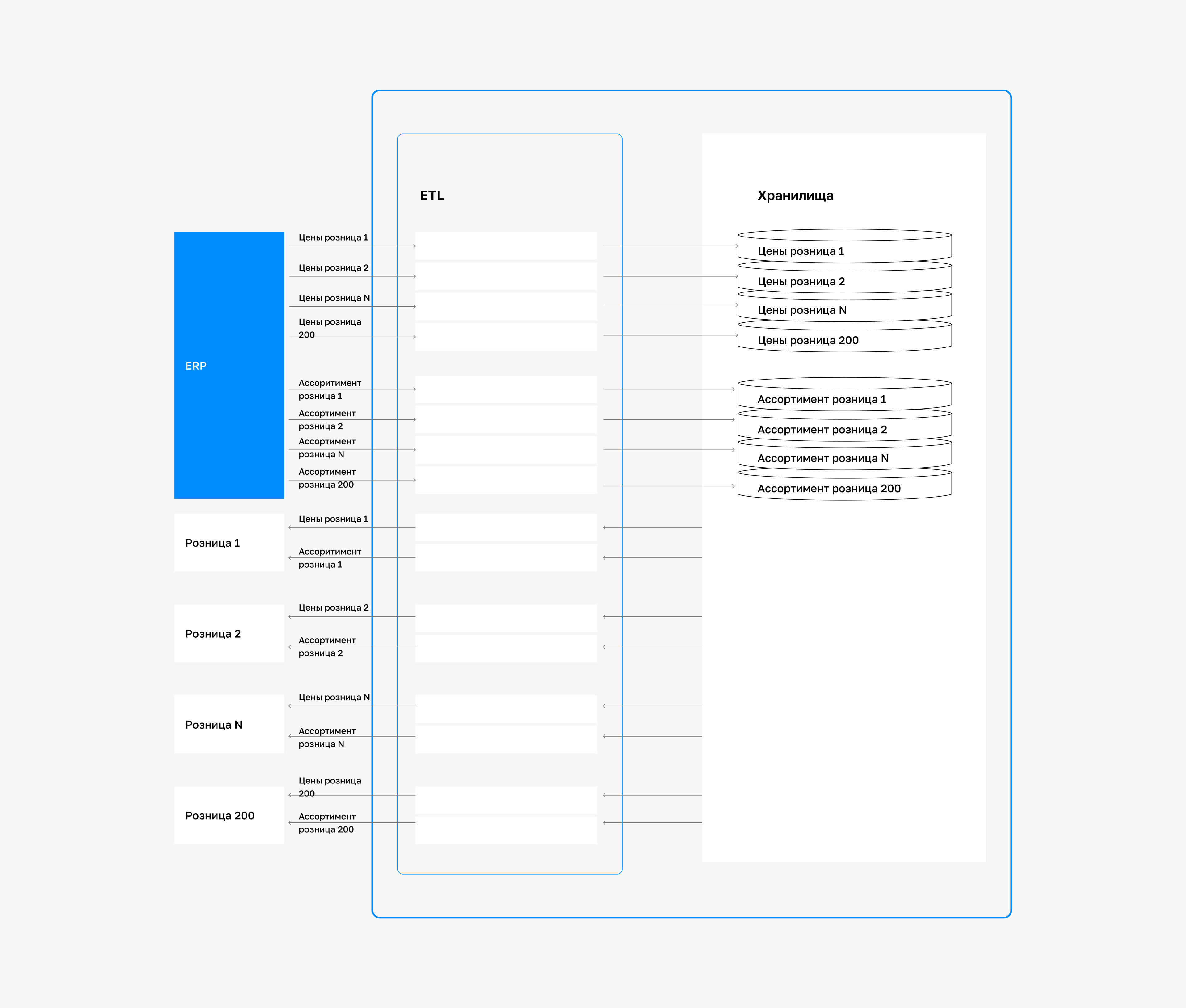
By choosing the right type of integration, a company launches new services faster, cuts costs, and improves data accuracy across all systems. Data integration (Data Integration/ETL) When sales, stock, and customer data are stored in different systems - CRM, ERP, Excel - it is impossible to get a complete picture.

Data synchronization solves this problem: it collects information from all sources, cleans it, and creates a single dataset that management can rely on. Core technologies: using _ETL and ELT_ Data is extracted from sources, validated, and loaded into a single repository. ETL is suitable when pre-load cleansing is important.

ELT - if you already have a strong cloud infrastructure and need fast loading of large data volumes. - Business value:the company gets a single source of truth for the entire enterprise. It builds reports faster, forecasts demand more accurately, and makes strategic decisions based on complete and up-to-date data. Application integration (Application-to-Application, A2A) sets up _direct interaction between software systems_ so data is transferred instantly and without human involvement.

Below are the main technologies and business benefits. API - a fast way to make two systems work together. If you need to connect, for example, an online store and CRM so orders go straight to a manager, you use an API, a data transfer interface. It is a direct and simple solution that fits standard tasks. - ESB - a single point for managing data exchange.

When a company has dozens of systems (CRM, 1C, warehouse, BI, marketing), connecting them directly becomes difficult and expensive. ESB (message bus) simplifies the architecture: all systems connect to it like a "central hub." The company can roll out new services faster - there is no need to change the connections between each component. Business value:you accelerate key operational processes.

For example, when an order from an online store appears instantly via API in a manager's CRM and in the 1C accounting system, you cut order processing time from hours to seconds and minimize errors.

Business process integration (Process Integration) This is the highest-level type of integration, which automates not just data exchange, but _entire end-to-end__business processes_, spanning multiple departments and systems. - How it works: you build a chain of actions where each event in one system automatically triggers the next action in another.

For example, receiving payment from a customer can immediately trigger a warehouse shipment request and notify the delivery service. Business value: you create a seamless customer experience and dramatically improve efficiency. Employees no longer spend time coordinating between departments, and processes run faster and more predictably. This is the foundation for full-scale digital transformation of the company.

Other practical types of integration - Integration through the user interface (UI): is used when a legacy system has no API or database access.

Using technologies RPA (Robotic Process Automation) you configure a software robot that imitates human actions - clicking buttons and filling out forms in the application interface. - File exchange:When large volumes of data need to be transferred between systems, but instant synchronization is not critical, file exchange is used. Programs export and import data as CSV or XML files through secure FTP servers.

This method is reliable and works well for tasks such as daily transfer of sales reports to BI system. However, it is not suitable where speed matters, for example when processing online orders in real time. A comparison of integration approaches is shown in the table below:

Integration typeWhat connectsKey business benefits
Data integrationData from different sourcesA single source of truth for analytics and reporting
Application integrationReal-time software systemsInstant execution of operational processes
Process integrationEnd-to-end business processesAutomating complex action chains across departments
UI integrationSystems without API, via the interfaceAutomating work with legacy software

Interesting fact: Back in 1991, the University of Minnesota created one of the first ETL systems to automatically combine data from libraries, schedules, and student records. It eliminated manual reconciliation and enabled faster analysis of the academic process. This became the foundation of modern ETL approaches, where data standardization matters as much as data transfer.

Discuss your challenge with an architect

Integration Practice in CIS: Real Cases

For CIS companies, data synchronization is becoming the _primary tool__digital transformation_ - we will look at examples of successful projects from retail and e-commerce.

1. "Azbuka Vkusa" - automated testing of digital services

Problem: During website and express menu development, testing teams worked separately. Each team used its own checklists and tools. This led to duplicated checks, slow onboarding of new testers, and delayed release updates.

Management did not have a unified view of digital product quality. Solution: the company implemented a centralized test management system, _TestRail_, and set up automated tests with _Selenium_ (a tool for automating browser-based checks).

All test scenarios were moved into a single database, and routine operations were handed off to automated tests.Results after 3 months: - Reduced the time spent on routine functional checks by 12x. - Accelerated onboarding of new testers by 40%. - Decreased the number of missed defects by 65%. - Started receiving summary product quality reports in real time.

2. "Muztorg" - IT architecture transformation for omnichannel commerce

Problem: 50 retail locations and an online store the Muztorg company worked across 30+ disconnected systems. Product, price, and stock data were duplicated and constantly drifted apart. This led to order errors, synchronization delays between online and offline channels, and high IT infrastructure support costs.

The company needed an effective solution _for integrating internal systems and external B2B services._ It also needed a roadmap, implementation plan, and budget for launching MDM and ESB solutions_._ Solution: our experts conducted a pre-project assessment and designed the architecture of a corporate data management platform.

  1. After analyzing 11 departments - from warehouse to marketing - we defined the technical requirements and selected the right solutions by comparing
  2. ESB and
  3. MDM systems across 70 criteria, from cost to the availability of specialists in the market.

Key solution components: - _ESB system___as a single gateway for integrating all internal systems and external B2B services - _MDM platform___for centralized management of item master data - _Target architecture_ with a phased implementation roadmap Important!When designing the solution, the expert team compared how everything works today with how it should work in the future, to avoid carrying over problem areas from the old system and to create a scalable platform for future business growth. Results: - Reduced the time needed to integrate new systems from 3-4 weeks to 2-3 days. - Increased the accuracy of product and stock data to 99.8%. - Cut IT landscape support costs by 35% in the first year. - Enabled instant data synchronization across all sales channels.

Mistakes that "kill" an integration project

Even expensive projects fail not because of technology, but because of management mistakes. Here is what usually goes wrong:

1. Weak business requirements analysis

A common mistake is to choose a technology right away (for example, "we need an ESB") without understanding the requirements. _How to avoid it:_ first define which data and actions must be exchanged between systems. Only then choose the right solution.

2. Ignoring data quality (Data Governance)

Integration does not solve the problem of poor-quality data. If the source information systems store "garbage", then transferring it between systems through integration buses will produce "garbage" on output. _How to avoid it:_ conduct a data audit and cleanup before starting. This can save up to 30% of the remediation budget.

3. Choosing the wrong architecture

Using an overly complex architecture, such as a full-scale ESB, to connect just 2-3 solutions is a mistake that leads to an unjustified increase in total cost of ownership (TCO). _How to avoid it:_ assess the actual needs. For simple connections, it is easier and cheaper to use iPaaS.

4. Poor communication between IT and business

Main problem: IT specialists build a solution without understanding the final business goals it is meant to serve. _How to avoid it:_ bring together a team that includes both business and IT. Define the expected outcome - for example, "reduce order processing time from 2 hours to 15 minutes."

5. No clear end-to-end testing plan

A mistake would be to test only individual communication channels instead of end-to-end processes. It is important to thoroughly verify all process scenarios - for example, the path of a test order from CRM to the warehouse system and back - to ensure the entire chain works correctly. _How to avoid it:_ run the full scenario - from the website to the warehouse and accounting. This will reveal 90% of issues before launch.

Customer Checklist: 7 Key Questions for the Integrator

Choosing an integrator - key step. Before signing the contract, make sure the contractor understands your business goals and can build a flexible architecture. Use our checklist to evaluate potential partners. 1. How will you address data quality issues?The contractor should state a clear plan: audit, cleansing, validation.

A professional integrator builds Data Governance into the project before the platform launches, instead of copying errors into the new architecture. 2. How will you ensure the new solutions work with our legacy systems?Clarify which technologies are used to support a hybrid environment and compatibility between legacy systems and new platforms. The ability to roll out solutions in stages without breaking older systems is critical for large companies.

3. Which specific data protection technologies do you use?Integration should run over secure channels (HTTPS, VPN) with a clear access-control model. Request a security protocol for all exchange points. 4. Which ROI metrics are built into the project?Demand specific numbers: how much order processing time will be reduced, and how much time and money automation will save. Without measurable KPIs, the project is in question.

5. What is the plan for supporting and scaling the architecture?The contractor should offer a flexible architecture (for example, based on ESB or iPaaS) that can scale without rebuilding the whole system. Clarify how support will be organized after launch. 6. What warranties on the work and SLAs on support do you provide?Check the support terms: incident response time, update procedure, and annual maintenance cost.

7. Can we see examples of similar projects in our industry? Request 2-3 case studies with reference contacts. Experience in your industry reduces risk and speeds up implementation. Important:A reliable integrator talks not about technologies, but about business outcomes. It studies your processes and proposes solutions with real impact. Such a contractor is not just a technical executor, but a partner who helps build a scalable architecture for business growth and automation.

Discuss your challenge with an architect

Discuss the article: Integration question: why does a business need it...

Send via: