Unified record
Details, legal entity, country, terms, files, stage, and owner are collected in one record.

How to automate contract approval among legal, finance, tax, and business teams in an international group of companies.
Process map
The contract record links legal entities, participants, tasks, versions, negotiation cycles, signing, and the archive—without one shared conversation for everyone.
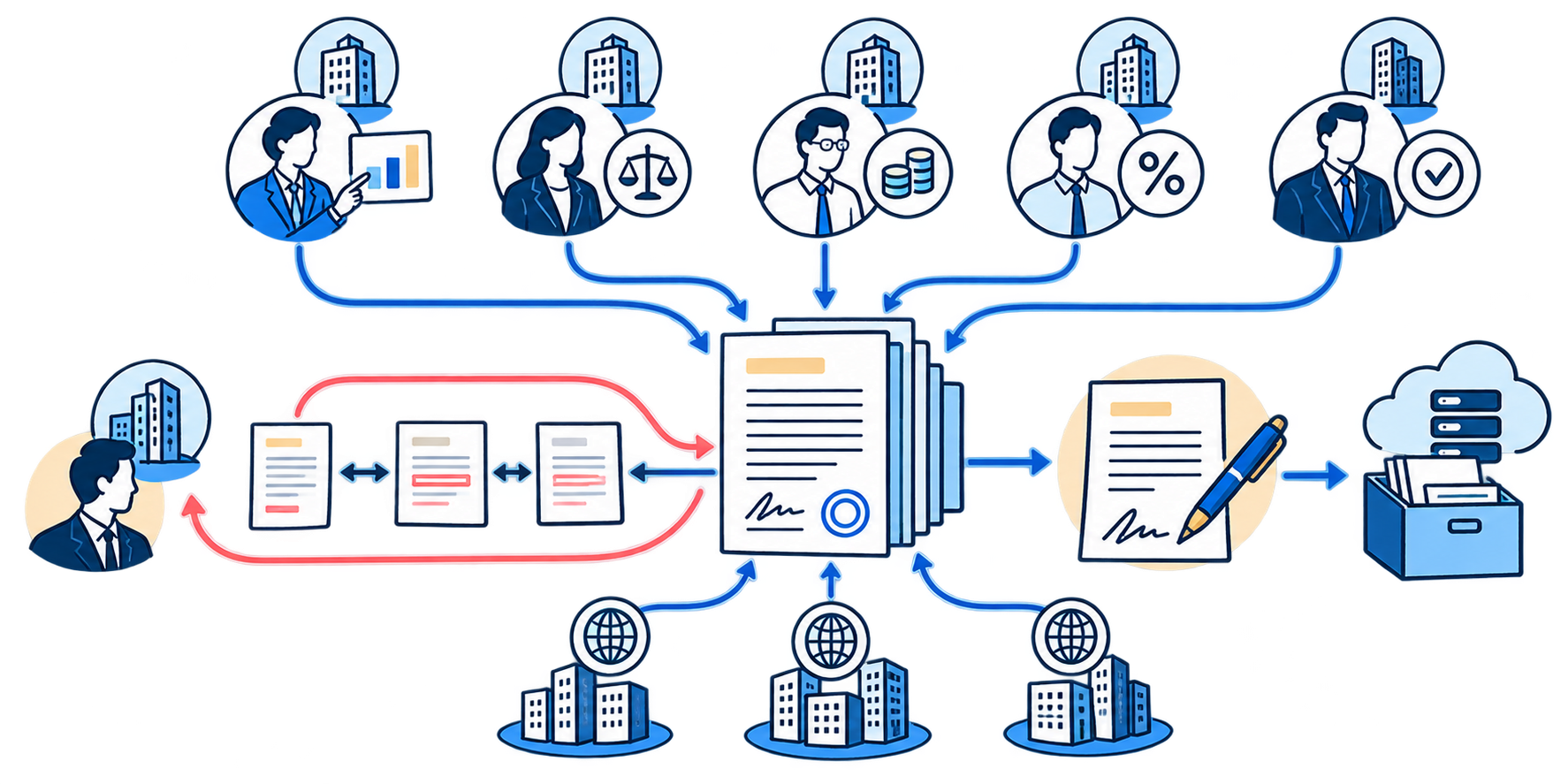
Details, legal entity, country, terms, files, stage, and owner are collected in one record.
Legal, finance, tax, and the initiator each receive their own context and outcome.
The system links document changes to the reason, author, and approval outcome.
The final version is transferred to the appropriate signing channel and remains available together with its history.
In an international group, one contract may pass through the initiator, legal, finance, tax, and management teams. Participants are based in different countries, work with several legal entities, and assess the deal terms differently.
When there are only a few contracts, the process can be managed by email and messaging apps. As the company grows, it starts to depend on employees' memory: it becomes difficult to identify the current version, reconstruct the reasons for edits, and determine who has the document. A counterparty may return the contract weeks later, when participants no longer remember which comments they made or why they approved a specific revision.
The workflow depends on the group company, the signatory's authority, and the internal requirements of the specific legal entity.
The counterparty's country, place of service delivery, currency, tax residency, and additional tax terms are important.
The document may go through a local EDI system, an international electronic signature service, or paper signing.
Local teams, the central function, and the business should see different levels of internal and confidential information.
Multiple language versions and negotiation cycles increase the risk of inconsistencies in the final terms.
The same contract type may require different approvers depending on the amount, country, and deviations from the template.
The contract record remains the single point of entry from the initial request through signing and storage. It is not replaced by a new task in each cycle: tasks are assigned to departments, documents are retained, and decisions are recorded within it.
This gives the company a single answer to the key questions:
| Participant | What it receives | What it returns |
|---|---|---|
| Initiator | The request form and questions about business terms | Source data, documents, and commercial decisions |
| Process coordinator | The complete record and all stages | The workflow, consolidated position, and next task |
| Legal department | Contract text and legal questions | Edits, risks, and the acceptable revision |
| Finance | Payment terms, currency, limits, and liability | Financial opinion or comments |
| Tax function | Countries, legal entities, and transaction model | Tax terms and restrictions |
| Manager | The prepared solution and material deviations | Management approval |
| Signatory | The final approved version | Signing outcome |
Tasks may run sequentially or in parallel. The contract process coordinator remains the owner of the end-to-end history and consolidates departmental decisions into a unified position.
A file repository stores documents, but does not explain what was sent to the counterparty, which changes they returned, which terms were accepted, or who requested a specific edit. A technical comparison shows changed words, but does not reconstruct the reasoning behind the decision.
The system therefore stores two linked layers: document versions with comparison results, and a decision history containing the author, reason, and review outcome. Internal comments should not automatically appear in the external revision: the coordinator prepares a separate clean version for the counterparty while preserving its link to the internal work.
The initiator selects the contract type and legal entity, enters the main terms, and attaches the documents.
The coordinator checks the data, accepts the request for processing, and determines the required approvals.
The system creates tasks for legal, finance, tax, and other participants based on defined conditions.
Department comments are consolidated, contradictions are resolved, and an external version is prepared.
The sent version is recorded, the counterparty's response is compared with it, and new changes are returned to the relevant roles.
The final version is transferred to the selected service, local EDI system, or paper-based process.
The signed document, deadlines, and obligations remain in the record and are transferred to connected systems.
Trying to do everything at once
Working MVP
Migration is a separate part of the project. To continue working, you may need records, statuses, owners, assignments, comments, an activity log, versions, attachments, and signed files. An Excel export of the contract list is not enough.
First, several completed contracts are used as control examples, and field mappings between the old and new systems are defined. Then several active contracts are migrated to verify whether work can continue from the current stage. Only after that is the bulk migration launched using the validated rules.
| Error | What happens | What to do |
|---|---|---|
| Automate the chaos | The system locks in unnecessary approvals | Check routes and authorities first |
| Create one shared task | Decisions get lost in correspondence, and access rights become merely formal | Separate the record and role-based tasks |
| Store files without decisions | The reason for an edit cannot be reconstructed | Link the version, comment, author, and outcome |
| Transfer only the current file | Users have to return to the old system to work | Define the required history and active tasks |
| Build the perfect product right away | The core process does not start for months | Launch an MVP and develop it iteratively |
| Choose the platform first | The process adapts to the tool's limitations | Define roles, data, and workflows before choosing |
The system can be implemented on a workflow or BPM platform, in an ERP system, corporate portal, specialized CLM system, or standalone application with integrations. The choice depends on contract volume, route complexity, security requirements, and the existing IT landscape.
The main criterion is the ability to support real roles, legal entities, versions, exceptions, and integrations. If the company already operates within 1C, a separate implementation option is described on the page 1C Document Management and Approvals.
Turnkey system
from request to archive
We will assess the current process, design roles and workflows, select a platform, build an MVP, migrate active contracts, and connect the required systems.
The first stage is a brief assessment of the contract process using several representative examples. This helps reconstruct actual workflows, identify gaps, distinguish mandatory approvals from established habits, and prepare the architecture for the first release.
The result is not another document repository, but a managed workflow covering requests, internal approval, negotiations, signing, and obligation monitoring.
FAQ
Not always. If the workflows are relatively simple, the process can be built on an existing BPM, ERP, or corporate platform. The decision is made after requirements assessment.
Yes, if it supports roles, access rights, linked tasks, document versions, activity history, and integrations. A standard status board is usually not enough.
Not necessarily. Active contracts, mandatory legal history, and archival data that only needs to remain searchable are identified separately.
Internal work and the external version must be separated. The prepared version is sent to the counterparty without internal discussions, while links to the decisions are retained in the system.
Yes. Requests, workflows, roles, files, versions, and statuses are launched first. Integrations, templates, analytics, and obligation tracking are added in subsequent iterations.
Review date: 21.10.2026