Inventory
Separate active processes, history, duplicates, and objects that do not need to be migrated.

Learn how to migrate projects from monday.com without losing links, files, permissions, or automations despite export limits and migration risks.
Migration map
Boards, links, files, permissions, and automations undergo inventory, trial migration, reconciliation, and a controlled switch.
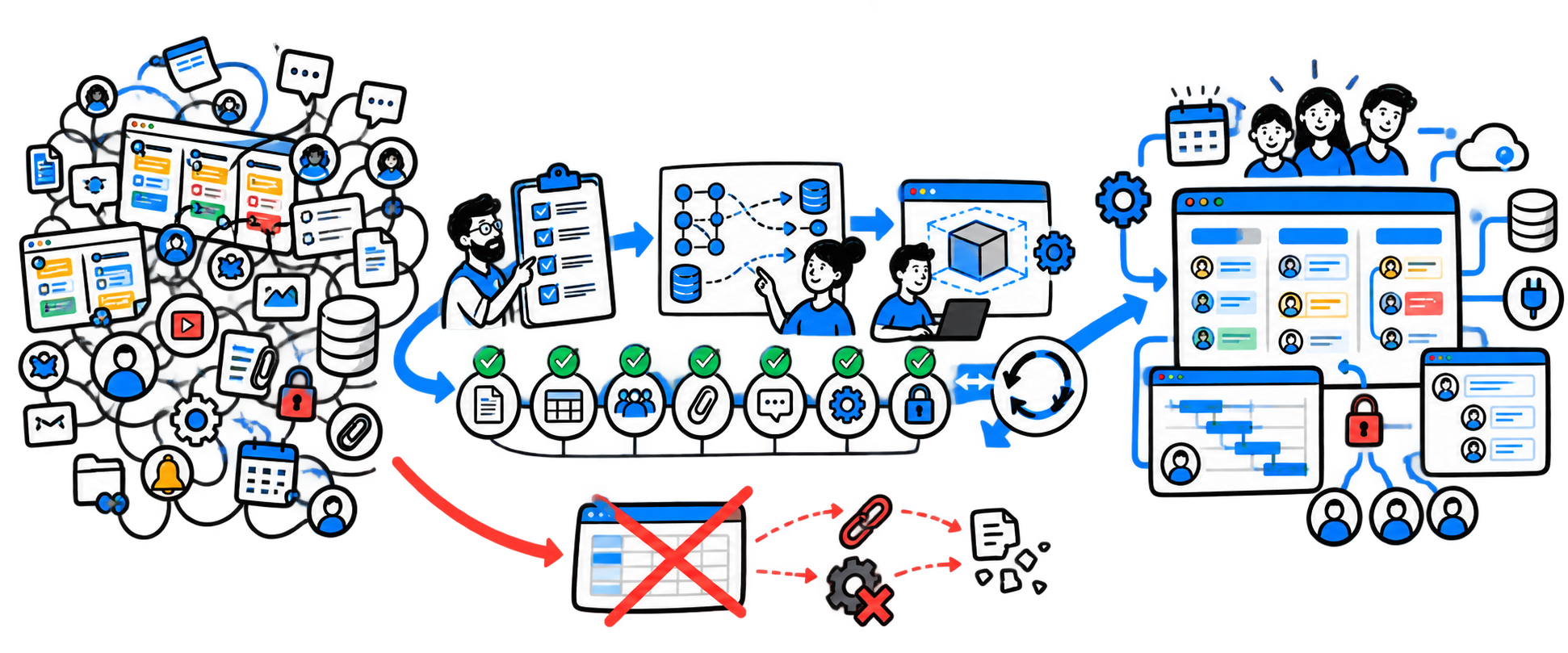
Separate active processes, history, duplicates, and objects that do not need to be migrated.
Define entities, statuses, roles, links, and data owners in advance.
Check a standard project, a complex project, and exceptions before the general cutover.
Map objects, restore the logic, migrate the delta, and continue from the correct stage.
When a company decides to leave monday.com, the first thought is usually about data: export the boards, migrate the tasks, and load them into a new system. But over several years, monday.com becomes a working environment where board links, automations, permissions, comments, and team habits together form a process.
The team fears losing discussion history, files, and dependencies, being unable to restore automations, disrupting active projects, or facing resistance to the new interface. These risks are real, but they can be managed by starting the migration with an inventory rather than an import tool.
| Method | What is preserved | What requires additional work |
|---|---|---|
| Full account export | Boards, including private and shared boards, along with uploaded files | Archived boards, Workdocs, dashboards, and the Emails & Activities feed are not included in a single package |
| Board export to Excel | Tabular values in the current view | Views, sorting, conditional formatting, part of the history, and subitem updates |
| Copying between monday.com accounts | The structure of selected boards and some settings | Integrations require reauthorization, and some automations cannot be migrated |
A full archive of a large account can take up to 24 hours to prepare, and the download link is available for a limited time. Standard export is therefore useful as a source of raw data and a backup, but it is not a ready-made migration package.
For each board, record its owner, purpose, activity, links, and the decision: migrate, merge, archive, or delete after approval.
Map not only field names but also business events. The same “Done” status can represent different stages in different teams.
Connect Boards, Mirror, formulas, and dependencies turn a set of tables into a data model. Primary records and entity keys must be identified.
Notification, status-change, and external-service exchange scenarios are documented separately and tested after configuration on the new platform.
Record private boards, guests, teams, owners, restrictions on changing columns, and file access.
| Risk | What will happen | How to control the process |
|---|---|---|
| Incomplete export | Some documents, correspondence, or archives will remain in monday.com | Use multiple extraction methods and a completeness register |
| Loss of links | Tasks will be loaded but will no longer be linked to projects and customers | Build the entity and key model in advance |
| Loss of automations | Statuses will stop triggering notifications and actions | Create a scenario catalog and test each one on the new platform |
| Errors by responsible users | Tasks will have no owners or will be assigned to the wrong users | Map user accounts before loading |
| Duplicates | The same client or project will appear multiple times | Define deduplication keys and merge rules |
| Active data discrepancy | The source system will continue changing during the migration | Define the freeze point and delta migration |
| Rejection of the new system | Employees will return to spreadsheets and chats | Include key users in testing and training |
As-is copying
Migration of the target process
The choice depends on why the company is leaving monday.com. For a controlled project environment, compare work and portfolio management systems. If projects must connect to CRM, procurement, inventory, production, or financial results, consider an ERP or industry platform. If monday.com also serves as a CRM, contract register, service desk, and knowledge base, first separate the subject areas and assign a data owner to each.
When pricing and administration are concerns, consider not only licenses but also integrations, support, and the cost of changes. If the target system must unify specialized processes, it is useful to start with An IT audit and requirements map, rather than comparing interfaces.
Identify departments, workspaces, active projects, the history period, data types, and decision owners.
Document boards, fields, links, automations, integrations, dashboards, permissions, files, and shadow processes in spreadsheets and chats.
Before loading, define entities, reference data, statuses, roles, events, field owners, and transformation rules.
Migrate one typical project, one complex project, and the exceptions; then run an end-to-end workflow.
Check the number of objects, fields, links, files, comments, assignees, automations, integrations, and permissions.
Record changes after the trial export and restrict edits in monday.com for a short period.
Provide role-based instructions, open a support channel, prohibit creating new work objects in monday.com, and retain the agreed archive.
Pre-migration assessment
1 process
We start with one workflow: document the boards, links, automations, permissions, and target-platform requirements, then prepare a pilot migration and reconciliation criteria.
FAQ
Excel is suitable for tabular data from individual boards. Views, part of the history, automations, integrations, and relationship logic require separate migration.
No. Active work often requires only current objects and an agreed history period. The rest can be preserved in an accessible archive.
Yes. A trial migration is usually performed first, followed by a short change window and a delta migration before the switch.
The timeline depends on the number of boards, links, automations, files, and integrations. Estimating the project by row count alone is not enough.
Yes, if the business needs a specific data or process model. The calculation includes support, permissions, logging, backups, and product development.
Review date: 21.10.2026