Get
Retrieve a document from EDI, email, an exchange folder, or an upload form together with its source metadata.

Learn how to collect documents from EDI, PDFs, and email, verify details, and send them to 1C without duplicate data entry.
Process map
Documents from EDI, email, and file uploads undergo different parsing but the same validation, deduplication, and routing.
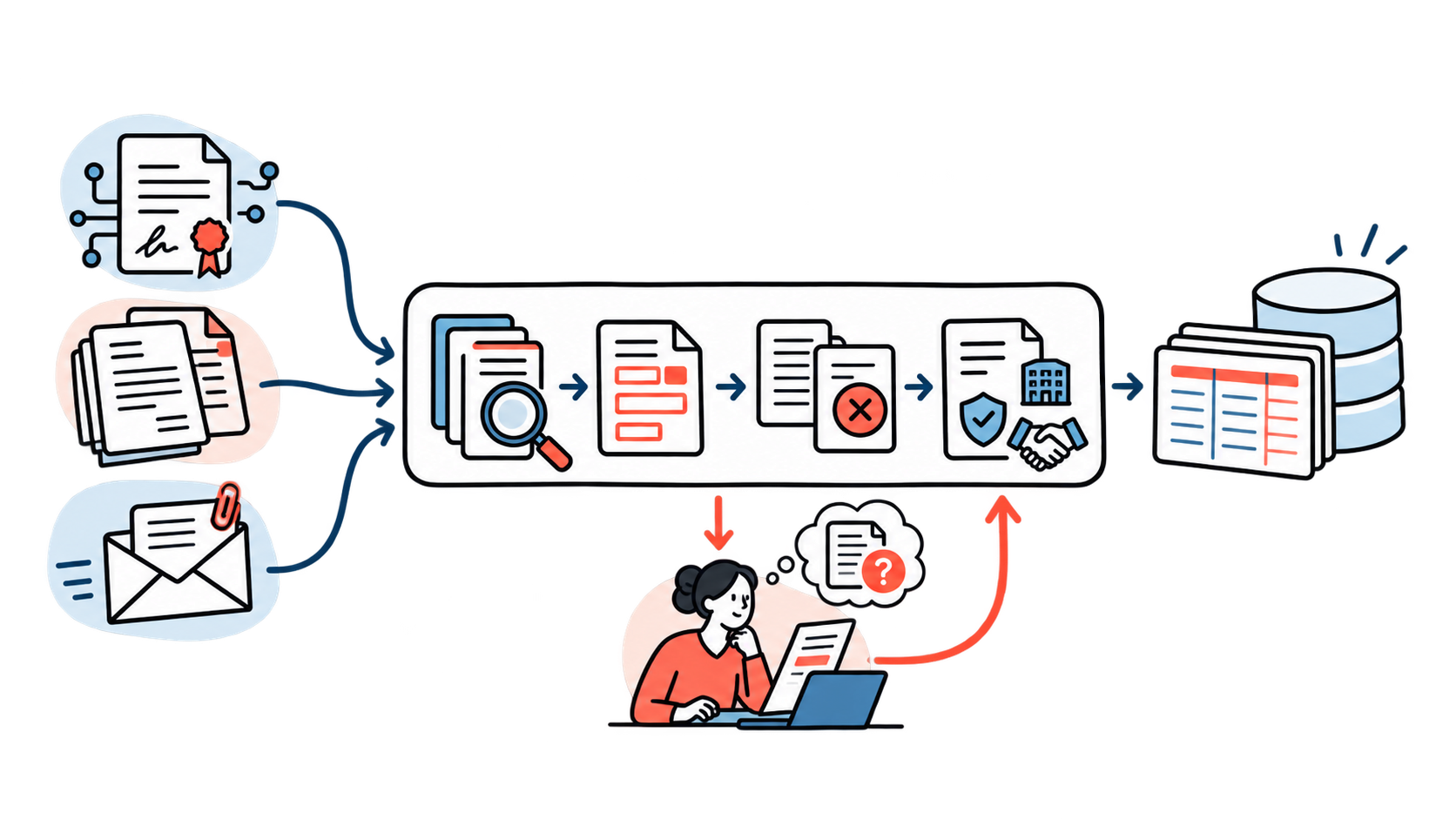
Retrieve a document from EDI, email, an exchange folder, or an upload form together with its source metadata.
Use structured EDI fields or extract details from the PDF and scan.
Find the counterparty, contract, organization, potential duplicate and rule conflict.
Create an object in the required 1C database or route an ambiguous case to an accountant.
Primary documents rarely reach a company through a single channel. One supplier sends a universal transfer document through EDI, another sends an acceptance certificate as a PDF, and a third emails an invoice scan. The accountant must open several systems, download files, find the counterparty, check the details, and re-enter the data in 1C.
The EDI operator transfers documents, statuses, signatures, and related events, but scans, unstructured PDFs, attachments, and corrected versions remain outside this channel. Therefore, the task goes beyond connecting SBIS or Diadoc: a unified process is needed for all incoming documents.
The system retrieves documents from EDI operators, mailboxes, exchange folders, personal accounts, and upload forms.
Distinguishes a structured document, a PDF with a text layer, a scan, an archive, a main file, and an attachment.
Receives details, amounts, VAT, currency, counterparty, contract, and document line items.
Maps data from different channels to a single internal document record.
It checks the organization, counterparty, supporting document, duplicate, closed period and rule conflict.
Selects the required information base and level of automated action.
Creates an object in 1C or assigns a clear task to an accountant while preserving the processing history.
| Characteristic | Structured EDI document | PDF or scan |
|---|---|---|
| Data | Already mapped to the designated fields | Require extraction |
| Signature | The electronic signature status can be checked | May be missing or located outside the file |
| Document type | Usually known | Classification is needed |
| Counterparty | Passed in metadata | Determined by the details |
| Main risk | Routing or matching error | Recognition error and incomplete data |
| Legal original | Stored within the EDI system | Depends on the origin and signing method |
A PDF received by email may be sufficient for preliminary processing, but it is not always a legally valid original. The delivery channel must not be confused with legal status: an electronic primary document must contain the required details and be signed with an electronic signature.
Within a group of companies, one mailbox or EDI account can receive documents for several legal entities. Routing is based on the recipient’s tax ID and registration code, operator unit, email address, contract, bank account, project, or site.
Rules must have priorities and produce explainable results. If the tax ID points to one organization but the contract is found in another database, the document must not be passed on silently: it goes to an exception queue with a description of the conflict.
Whether it was found by its tax and registration numbers, whether multiple records exist, and whether the name and details match.
Whether required fields are completed, the amount and VAT match, and the date does not fall within a closed period.
Whether the contract or order was found, and whether the document matches its legal entity and defined limits.
Whether the same document arrived through another channel and whether the file is a new corrected version.
Whether required attachments are present and can be processed separately from the main document.
Which values came from the structure, which were recognized, and which require user confirmation.
The integration method depends on the configuration, workload, and security requirements. The standard OData-based REST interface of the 1C platform enables reading and modifying catalogs, documents, registers, tasks, and business processes via HTTP. Other projects use 1C HTTP services, configuration extensions, message queues, integration platforms, or scheduled file exchange.
The mechanism cannot be selected based on connection simplicity alone. Document volume, acceptable latency, load on 1C, integration-user permissions, retry handling, and status updates to the external system all matter. For companies that need this type of exchange, we design and implement 1C integrations with external systems.
| System / layer | Scope of responsibility |
|---|---|
| Create a draft | The system fills in the record, and an accountant verifies the details before saving. Suitable for new rules and incomplete data. |
| Save document | The object is created in 1C without posting. The user checks the basis, accounting dimensions, and future journal entries. |
| Post automatically | Allowed only for a trusted source, unambiguous data, an open period, and a rule validated on a sufficient set of documents. |
Even a well-designed workflow cannot process every document automatically. The key interface is therefore an exception queue showing the reason for the stoppage, disputed fields, the original file, the suggested value, related objects in 1C, and permitted user actions.
The task should be specific: “contract not found,” “two counterparty records detected,” “amount differs from the order,” “document belongs to a closed period,” or “possible duplicate receipt.” After the issue is resolved, the system can remember the rule, but it should apply it automatically only within predefined boundaries.
Integration does not end with creating a document in 1C. The incoming workflow stores the processing status, accounting-system object ID, validation result, correction request, cancellation details, integration error, and number of retry attempts.
EDI provider APIs make it possible to retrieve content, signatures, current statuses, and event history. This makes the exchange two-way: the accountant sees not only the uploaded file but also the current status of the entire document workflow.
Choose one high-volume document type and one organization with a clearly defined process owner.
Start with the primary EDI provider and retain documents with their metadata and history.
Send data to 1C without automatic posting and collect the reasons for manual corrections.
Turn recurring errors into explicit validations and manageable tasks.
Add classification, detail extraction, and quality control for unstructured documents.
Connect other databases and legal entities, then enable automatic posting for safe scenarios.
| Error | What happens | What to do |
|---|---|---|
| Recognize everything indiscriminately | Structured EDI data is replaced with a less accurate OCR result | Separate structured and unstructured documents |
| Create a separate process for each channel | Rules and reference data begin to diverge | Use a shared model and shared validations |
| Create counterparties automatically | Duplicates appear in the directory | Set separate rules and confirmation |
| Enable posting immediately | The error enters accounting before the process is checked | Start with drafts and recording without posting |
| Do not retain the original file | The source, signature and version cannot be recovered | Link the 1C object to the original and the activity log |
| Evaluate OCR only | A well-recognized document is assigned to the wrong organization or contract | Measure the entire path to a valid accounting object |
Turnkey integration
EDI + PDF + email + 1C
We will assess the document flow, design a unified model, connect sources, configure validations, and launch a pilot for one high-volume scenario.
For the initial assessment, choose one high-volume workflow and collect examples of varying quality: a valid structured UPD, a standard PDF, a poor scan, a corrected version, a document without a contract, and a potential duplicate. These examples can be used to test routing, data quality, and the real limits of automation.
The assessment produces a map of sources and databases, a unified document model, a list of checks, an exception queue, and a pilot plan. This enables the gradual removal of manual entry without compromising accounting quality.
FAQ
For standard documents, in many cases yes. New counterparties, poor scans, contract discrepancies, and closed periods must still be sent for review.
Not always. Structured documents are best processed based on their structure. AI is useful for PDFs, scans, file classification and ambiguous data.
Yes. The integration layer converts their data and statuses into a shared internal model.
Yes, for verified scenarios with unambiguous data and defined limits. During the pilot, creating drafts is safer.
The workflow compares source identifiers, details and content. An exact duplicate is blocked, while a corrected version is linked to the previous one.
Yes, if routing considers the tax ID, registration code, contract, department, EDI mailbox, and target 1C database.
Review date: 23 October 2026