Identify spend
Invoices, cards, reimbursements, emails, work accounts, and department purchases.

A practical guide for finance leaders on consolidating SaaS spend, spotting unused seats, reviewing contracts, and managing renewals.
Financial control framework
A payment shows the expense. For a management decision, you need to add the working account, budget owner, users, actual usage, documents, and renewal terms.
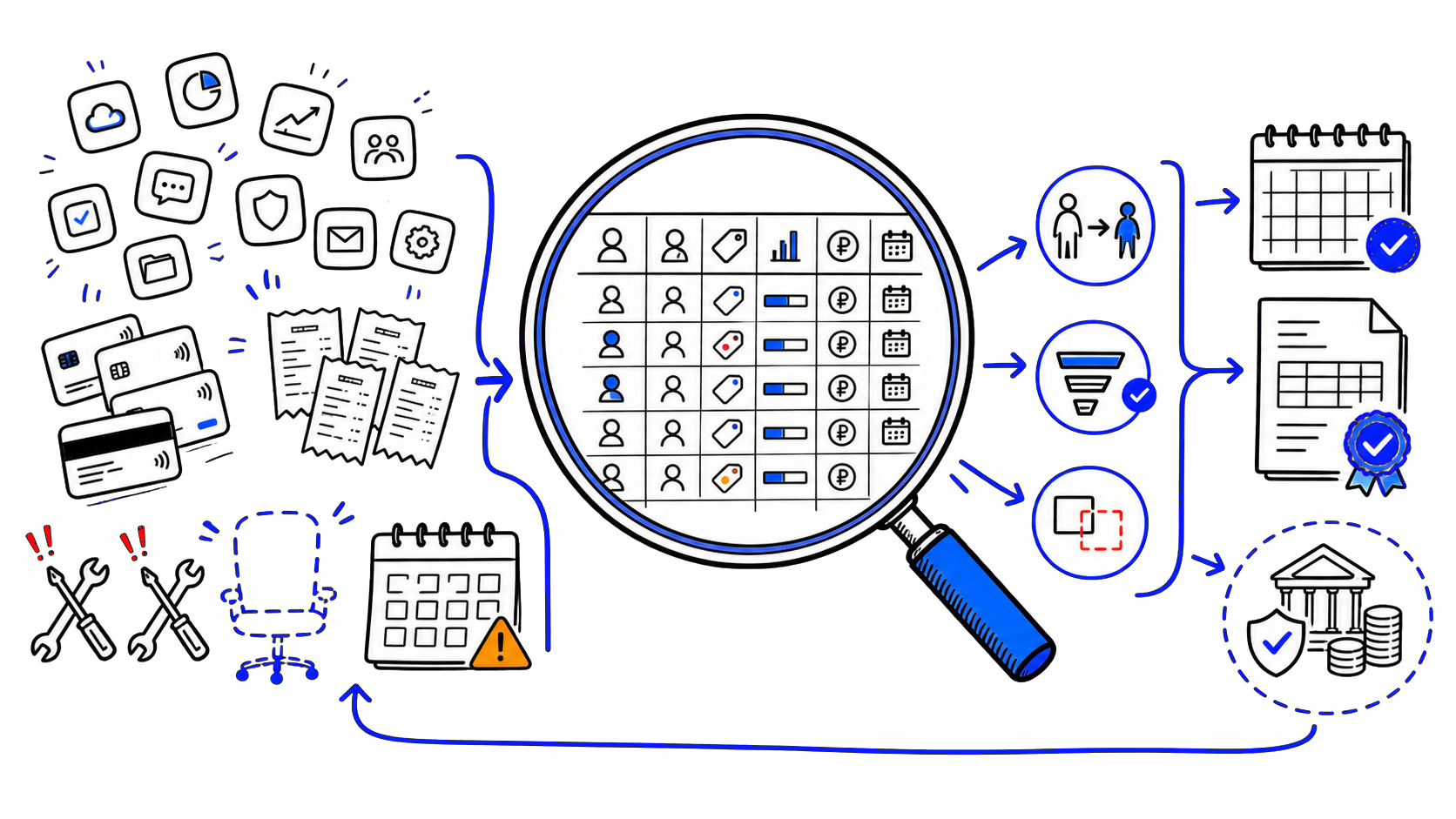
Invoices, cards, reimbursements, emails, work accounts, and department purchases.
Owner, users, plan, activity, documents, and total cost.
Keep, reassign, change plan, merge, replace, or cancel.
Owner, limit, payment route, and decision date before renewal.
The expense is visible, but there is no management context
The expense is ready for a decision
The accounting system answers how much the company paid and to whom. A renewal decision also needs three more layers: which corporate account was paid for, who is using the seats, and which service function supports the workflow. Without that connection, the same expense line can mean a needed tool, a forgotten account, or a plan with unnecessary features.
A CFO does not need to personally assess the work of designers in Figma or developers in Cursor. The task is to define evidence requirements. The administrator shows seats and activity. The function leader confirms the task and required capabilities. Finance converts the cost to rubles, checks documents, budget, and the date of the next decision.
The accounting unit becomes a separate account or workspace. One vendor can occupy several lines: team seats, variable usage, and employees' personal subscriptions have different owners, documents, and renewal terms.
One register line corresponds to a separate account or workspace. Different seat types and variable usage can be split into sublines.
| Field | What to record | What decision does it support |
|---|---|---|
| Service and account | Vendor, workspace, region, corporate email | Link the payment to a specific accounting item |
| Budget owner | Manager, cost center, administrator | Get confirmation and assign an owner |
| Work task | Process, team, required features | Justify the plan and seat count |
| Plan and period | Plan, month or year, start and renewal date | Choose a window for changing terms |
| Seats and activity | Purchased, assigned, free, active users | Reallocate or reduce seats |
| Total cost | Plan, overage, taxes, conversion, fee, support | Compare options in rubles over the same horizon |
| Documents and workflow | Invoice, contract, supporting documents, payment method | Check payment completeness and stability |
| Data & integrations | Projects, export, SSO, API, plugins | Assess the financial risk of replacement or shutdown |
| Decision and deadline | Verdict, action, owner, date | Include the change in the budget before renewal |
Export transactions, invoices, service acts, corporate cards, expense reimbursements, and renewal notices for a full annual cycle.
Merge different spellings of the vendor name and link each payment to the workspace, sign-in method, and document set.
For each service, record the cost center, the function lead, and the administrator who can export seat data.
Get the number of purchased, assigned, and active seats, key user actions, and an explanation of seasonal or backup access.
Convert costs to rubles and a single period. Add variable usage, taxes, currency conversion, fees, and support time.
Record the verdict, expected budget change, effective terms, and the person responsible for execution.
Put review dates on the calendar and update the register when hiring, role changes, termination, or a new service request occurs.
Low activity triggers a review. The final decision takes into account the business task, cost, data, integrations, and switching cost.
| Verdict | Financial signal | What to confirm before acting |
|---|---|---|
| Keep | The expense fits the budget, seats are used, and the plan supports the process | Owner, variable usage limit, and next review date |
| Reallocate | There are paid unused or inactive seats | Ability to transfer a seat without losing data or history |
| Change plan | Paid features are not used, or the team regularly exceeds limits | The new full cost, restrictions, and the effective date of changes |
| Merge | One product is paid for through multiple personal and team accounts | Data ownership, domain, administrators, and migration plan |
| Replace | Two services cover the same task, and the overlap after migration covers the transition | Export, integrations, training, overlap period, and transition owner |
| Deactivate | No owner, users, data, or confirmed business need | Archive, hand off work materials, and revoke integrations |
List of workspace members and owners, billing method, plan, and task confirmation from the team lead. For Business, supplement usage data with work artifacts and regular budget owner confirmation.
Team members, active user and action statistics, plan, billing, and additional usage. The financial question: which paid features are used regularly and what limit the team needs.
The number of Full, Dev, Collab, and View seats, recent activity, projects, and the renewal date. The financial question: can expensive roles be reassigned, and when does the plan allow reducing their number?
Product type - Premium, Sales Navigator, Recruiter, or Learning; assigned licenses; available reports; contract owner; and renewal date. Track personal and corporate subscriptions separately.
| System / layer | Scope of responsibility |
|---|---|
| CFO | Control rules, total budget in rubles, decision matrix, and renewal calendar. |
| Accounting or treasury | Payment register, contracts, invoices, closing documents, and actual charges. |
| IT or service administrator | Accounts, seats, roles, activity, integrations, and the technical terms for changing the plan. |
| Function leader | The work task, user list, required features, and confirmation of seasonal access. |
| HR and Information Security | Events for granting and revoking access, data requirements, and control of personnel changes. |
Pay basis
Share the list of active and planned foreign services. Osnova Pay will help match payments to accounts and owners, verify seats and plans, calculate the total cost, and arrange future payments from a CIS legal entity.
FAQ
Start with the financial trail for a full annual cycle: payments, invoices, corporate cards, reimbursements, and renewal notices. Then link spend to accounts, budget owners, and cost centers.
Ask IT for accounts, purchased and assigned seats, activity, roles, integrations, and renewal dates. Ask the function leader for the business task, user list, needed features, and an explanation of seasonal access.
The CFO owns the rules and decisions. Operational updates can be delegated to procurement, IT, or a financial controller, as long as each line still has a budget owner and a service administrator.
Match seat assignment to activity and the business task over a period that fits the process. If there is no activity, request confirmation, then consider seasonality, criticality, and the cost of restoring access.
When the team structure and need are stable for the full term, and the price difference covers the risk of unused seats. Before approval, check the seat reduction rules, refund terms, and the effective date of changes.
First confirm the business task and find the corporate account. Then compare reimbursement with a managed payment flow by cost, documents, data ownership, and access continuity.
Yes. In service for managing and paying for foreign subscriptions You can start with one account, get an estimate before payment, and then add the rest of the services to the shared register.
Review date: August 17, 2026