Accounting system
Odoo, 1C, or another ERP generates the invoice from validated details, line items, and tax data.

Learn UAE e-invoicing deadlines and how to prepare Odoo, 1C, and other systems for accredited provider exchange.
Exchange map
Readiness is determined not by the invoice print form, but by data completeness, integration, status handling and incoming document processing.
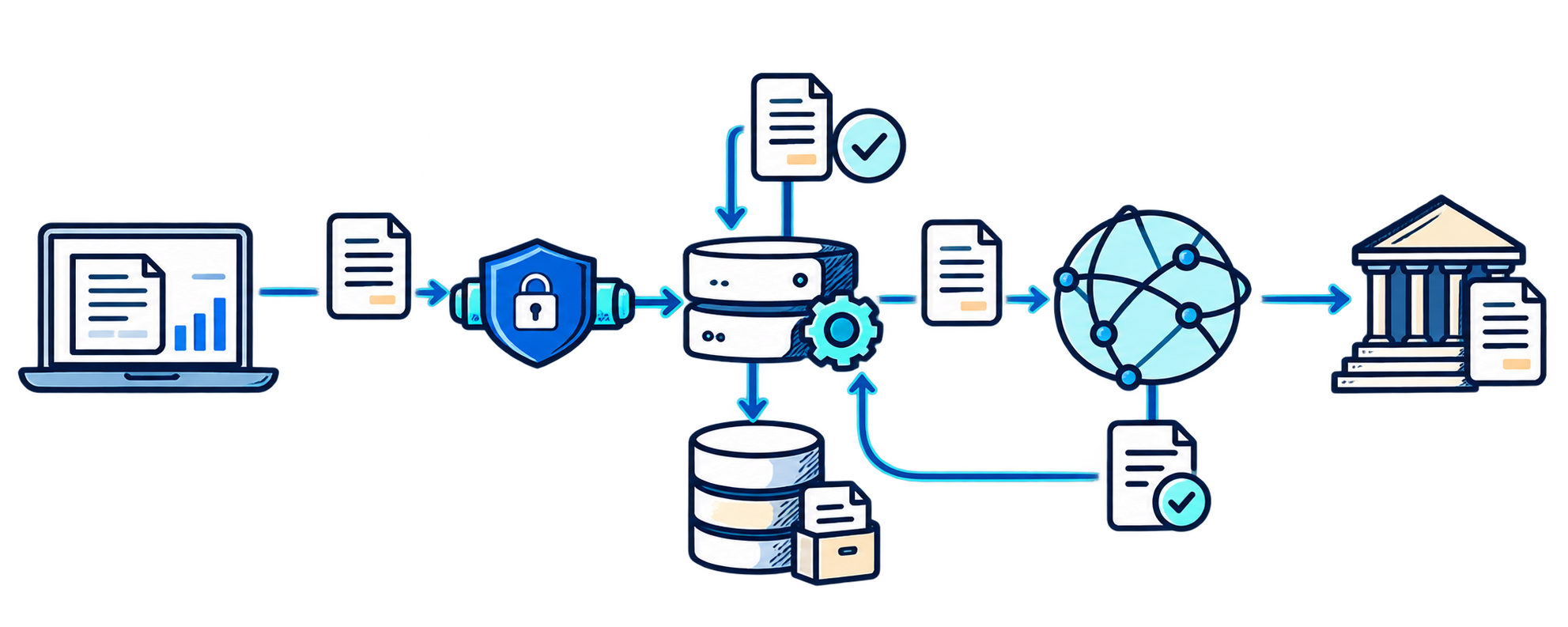
Odoo, 1C, or another ERP generates the invoice from validated details, line items, and tax data.
Maps fields, validates the document, sends it to the provider, and returns statuses.
Ensures regulated exchange of electronic invoices and transmission of tax data.
The company handles rejections, incoming documents, retries, and maintains an exchange history.
An electronic invoice under the UAE's new system is a structured data set exchanged between the supplier and buyer and submitted to the Federal Tax Authority. The Ministry of Finance specifically states that a PDF, Word file, image, scan, or email is not an eInvoice by itself.
The system primarily covers B2B and B2G transactions, except in specifically defined cases. Exchange is based on OpenPeppol and the national PINT AE specification. Therefore, the accounting system must generate a complete data set, send it to an accredited provider, receive technical statuses, and retain the processing history.
| Category | Appoint an accredited provider | Mandatory go-live |
|---|---|---|
| Annual revenue of 50 million AED or more | By 30 October 2026 | 1 January 2027 |
| Annual revenue below 50 million AED | By 31 March 2027 | 1 July 2027 |
| Government entities within the scope of the requirements | By 31 March 2027 | 1 October 2027 |
The pilot phase began on July 1, 2026. From this date, organizations may also join voluntarily. From January 1, 2027, transactions between members of the same tax group will be temporarily excluded from the mandatory scope for 24 months. Following the changes of October 19, 2026, data does not have to be physically stored only in the UAE, but the organization must retain electronic invoices, credit notes, and related information for the prescribed period and provide it to the tax authority upon request.
From Odoo or 1C to the buyer and tax environment
Source
Preparation
Regulated exchange
Recipients
Result
An accredited provider provides access to the e-invoicing infrastructure but does not fix processes or data within the company. Before connecting, determine where the original invoice is created, which system stores the parties’ details, who handles errors, and how the received document becomes an accounting entry.
Currencies, discounts, advance payments, credit notes, intercompany transactions, and cross-border operations require separate checks. If the rules are not aligned, the connected system will reject documents or move manual work from email to an integration error queue.
Odoo supports EDI and Peppol for several countries, but standard Peppol functionality does not confirm readiness for UAE national requirements. In the current Odoo 18 documentation, the UAE is not included in the published list of countries for standard Peppol registration, while UAE rules require appointing a provider from the Ministry of Finance list.
In practice, you need to verify the localization and capabilities of the selected ASP, then determine the integration method: a direct API or a separate middleware service. If necessary, add missing fields, validation rules, an exchange queue, and clear business-user statuses in Odoo. Learn more about system implementation and customization on the page Turnkey Odoo.
Complete organisation and counterparty directories, tax settings, identifiers, units of measure and mandatory invoice fields.
Generate invoices and credit notes, validate the data, send it to the provider's API, and return the processing result to the 1C document.
Receive documents, identify the supplier and transaction grounds, prevent duplicates, and create an accounting record with user control.
Maintain a log, retry queue, notifications, access rights and an archive of electronic documents together with related statuses.
Having CIS EDI in a 1C configuration does not mean it complies with the UAE model: formats, operators, and transmission rules differ. However, replacing the core ERP is usually unnecessary; an integration layer can be created between 1C and an accredited ASP.
If a group uses 1C, Odoo and other systems simultaneously, the owner of each data type is defined before development. Details, tax categories and amounts must not be edited independently in multiple sources.
The preparation principle remains unchanged:
An ERP may have a localized module, a ready-made provider adapter, or only a general integration interface. Choose the architecture after checking the specific version, transaction volume, number of legal entities, and ASP capabilities—not just the platform name.
| Error | Consequence | What to do |
|---|---|---|
| Treat a PDF as an electronic invoice | The document does not pass regulated structured exchange | Generate and transmit the complete data set |
| Start with a connector without an audit | Master data and tax errors are sent to the external environment in bulk | Check data and owners before integration |
| Configure outgoing documents only | Incoming invoices remain a manual process | Design both directions |
| Do not return statuses to the ERP | The accountant does not know whether the document was delivered | Store the technical and business status in the record |
| Test one simple invoice | Errors emerge in credit notes, currencies, and discounts | Check the catalog of real-world scenarios |
| Fail to assign an exception owner | Rejections accumulate in the technical log | Create a queue, SLA, and owners |
Document legal entities, departments, transaction types and mandatory connection dates.
Identify the sources of outgoing and incoming documents, manual operations, integrations, and data owners.
Assess details, tax settings, currencies, units, transaction grounds, and master data quality.
Compare accredited providers by API, scenarios, SLA, security, test environment, and cost.
Configure mapping, validation, outgoing and incoming exchange, statuses, retries, and archiving.
Run real transactions across different legal entities, currencies, taxes, discounts, advance payments, and credit notes.
Assign exception owners, configure monitoring, and track changes to regulatory requirements.
Turnkey e-invoicing
Odoo · 1C · ERP
We assess processes and data, help define ASP requirements, design the integration, configure incoming and outgoing exchange, and conduct testing before mandatory go-live.
FAQ
No. The UAE Ministry of Finance explicitly states that PDFs, Word files, images, scans, and emails are not eInvoices by themselves. Structured electronic exchange is required.
Usually not. The existing ERP can be retained if it generates the required data and is integrated with an accredited ASP.
Peppol functionality does not replace verification of the national PINT AE specification or operation through a UAE-accredited provider. The specific scenario depends on the Odoo version and ASP.
An ASP must be appointed by October 30, 2026, and mandatory go-live is set for January 1, 2027.
Start by defining the scope of legal entities and transactions, auditing the data, and assessing the current ERP capabilities. Choosing a connector comes next, not first.
Review date: 21.10.2026