Odoo
CRM, quotes, orders and operational statuses within the agreed scope.

Learn how to connect Odoo and 1C, define data ownership, sync orders, products, stock, and payments, and control errors.
Exchange map
Odoo and 1C can own different parts of the process when owners, keys, events and failure-recovery rules are defined for master data and documents.
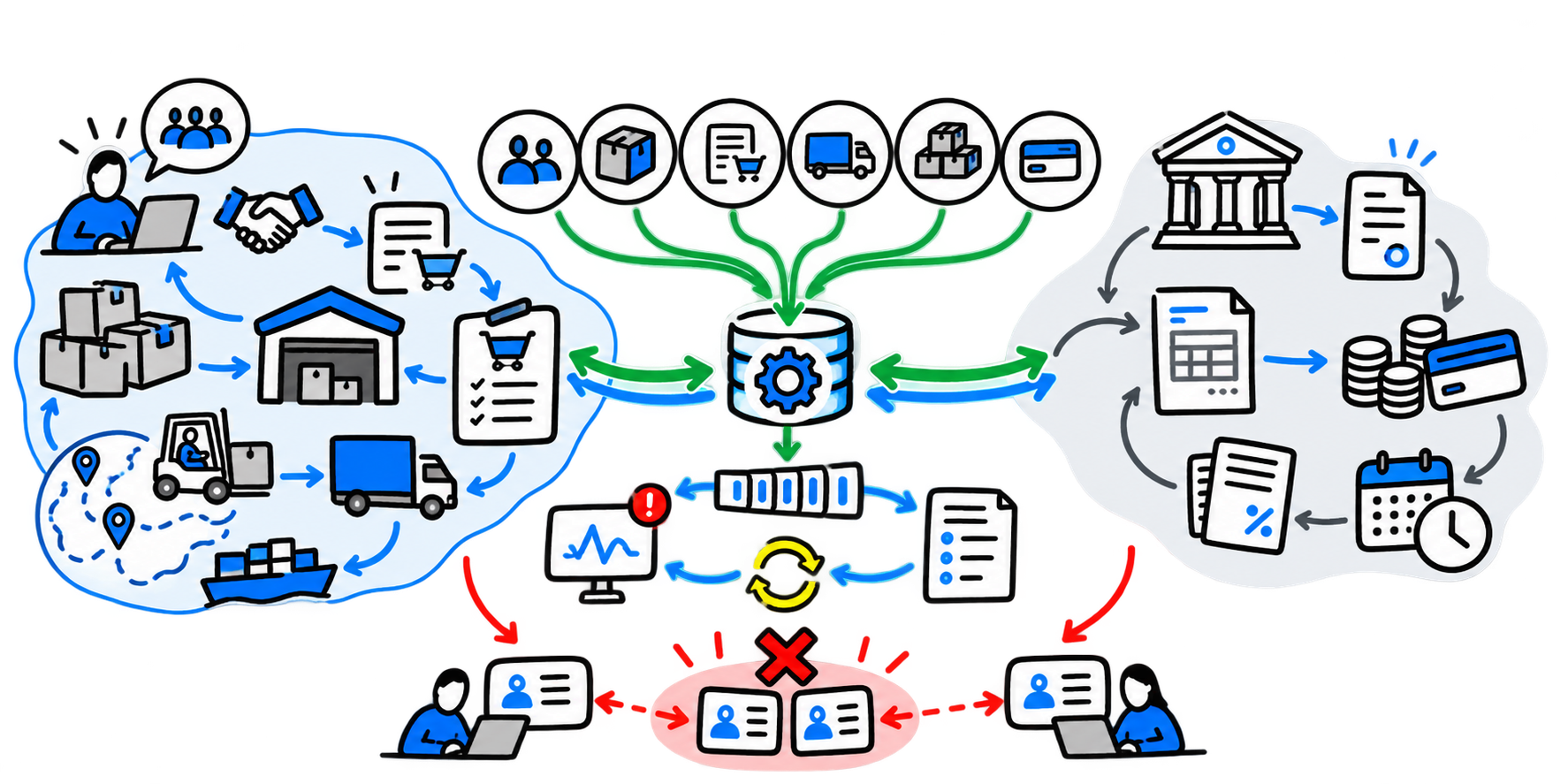
CRM, quotes, orders and operational statuses within the agreed scope.
Statutory accounting, documents, settlements and period closing for a CIS legal entity.
Key mapping, data transformation, delivery, retries and error logging.
Reconcile amounts, taxes, lines, stock and payments using control examples.
An international group may use Odoo for CRM, sales, procurement, warehousing and order management, while its CIS legal entity uses 1C for statutory accounting. The parent company still needs a unified view of orders, operations and payments.
Without integration, employees recreate business partners, item masters and documents, share payment statuses in chats and reconcile stock manually. Errors are discovered during shipment or month-end closing. The goal of data exchange is to eliminate duplicate entry and give each role a clear, verified data source. For companies with legal entities in the UAE, it is also important preparing Odoo and 1C for mandatory e-invoicing.
Odoo provides an external API for working with models and data. The 1C platform supports HTTP and web services, OData, JSON, XML, exchange plans and scheduled jobs. The technical options are sufficient; the complexity lies in the meaning of the operations.
Before choosing the transport, agree when an order is considered confirmed, which event reduces available stock, which date becomes the sales date, how currencies and units of measure are mapped, whether a posted document can be changed, and what happens during a return or partial shipment. Otherwise, the connector will quickly transfer the conflict between systems.
| Object | Possible owner | What the second system receives |
|---|---|---|
| Lead and opportunity | Odoo | Qualified business partner |
| Counterparty | Odoo or 1C, according to the agreed rule | Stable identifier and details |
| Item master | Odoo, PIM or 1C | Code, name, unit and tax group |
| Commercial proposal | Odoo | Order basis |
| Customer order | Odoo | Document for execution and accounting |
| Implementation | 1C or Odoo — depending on the warehouse system | Number, date and accounting status |
| Stock | Warehouse system of record | Available quantity by warehouse |
| Payment | 1C or banking system | Payment status, amount, date and currency |
| Accounting entries and period closing | 1C | Aggregated financial result |
The allocation depends on how sales, the warehouse and accounting actually operate. The basic rule is simple: two systems must not independently create and modify the same object.
Stable key, legal status, settlement currency and details. Changes to banking or tax details require approval from the responsible person.
Code, name, unit, variants, tax category, packaging and serial tracking. Different units require an explicit conversion rule.
The base price is kept separate from the price list, discount and actual line price. For international operations, the currency, exchange rate and effective date are recorded.
Odoo sends the confirmed order and receives the document number, status, shipped quantity and reason for any discrepancy.
A specific quantity type is transferred: physical, free or available after reservations, together with the warehouse and calculation timestamp.
The banking or accounting system returns the amount, date, currency and matching result for the order or invoice.
| Flow | Reasonable approach | Why |
|---|---|---|
| Confirmed order | Event after confirmation | Delay affects execution |
| Critical payment status | Event or short interval | Changes the shipping decision |
| Large product catalog | Batch loading plus changes | Full real-time processing creates unnecessary load |
| Stock available to the manager | On an event or after a defined delay | Frequency depends on the cost of breaking a promise to the customer |
| Data for BI | On a schedule | For reporting, an agreed schedule is usually sufficient |
Use real-time processing where a delay changes an employee's or customer's action. Batch processing is easier to control and maintain for other flows.
For example: confirmed order in Odoo → document in 1C → sales transaction → payment status in Odoo.
Document the entities, owners, keys, required fields, reference data and permitted changes.
Test a standard order, currency, discount, partial shipment, return, unknown item, duplicate and system unavailability.
Before automating the flow, configure a log, delivery statuses, a retry queue and error notifications.
Compare document counts, amounts, taxes, currency, lines, stock and payments; queue discrepancies for review.
Start with one legal entity, business unit or order type, then expand the scope after stable operation.
Integration pilot
1 process
We will take a real order or another end-to-end document, define data owners, events, change rules and test cases, then choose an adequate data exchange architecture.
FAQ
A ready-made module can speed up the technical connection, but it must be checked against system versions, data models and business processes. Mapping statuses, taxes and documents requires configuration.
The system where the catalog is managed as a core process. This may be Odoo, 1C or a separate PIM; the other systems receive an approved copy.
No. Bidirectional exchange is needed where both systems create significant events. For most fields, one owner and one-way propagation are safer.
Yes. With a small number of flows, a direct adapter may be sufficient. With complex logic, a separate integration layer simplifies transformations, retries and observability.
Choose one end-to-end process and provide examples of objects from both systems: records, orders, products, stock, payments and statuses.
Review date: 21.10.2026